Laravel Telescope
簡介
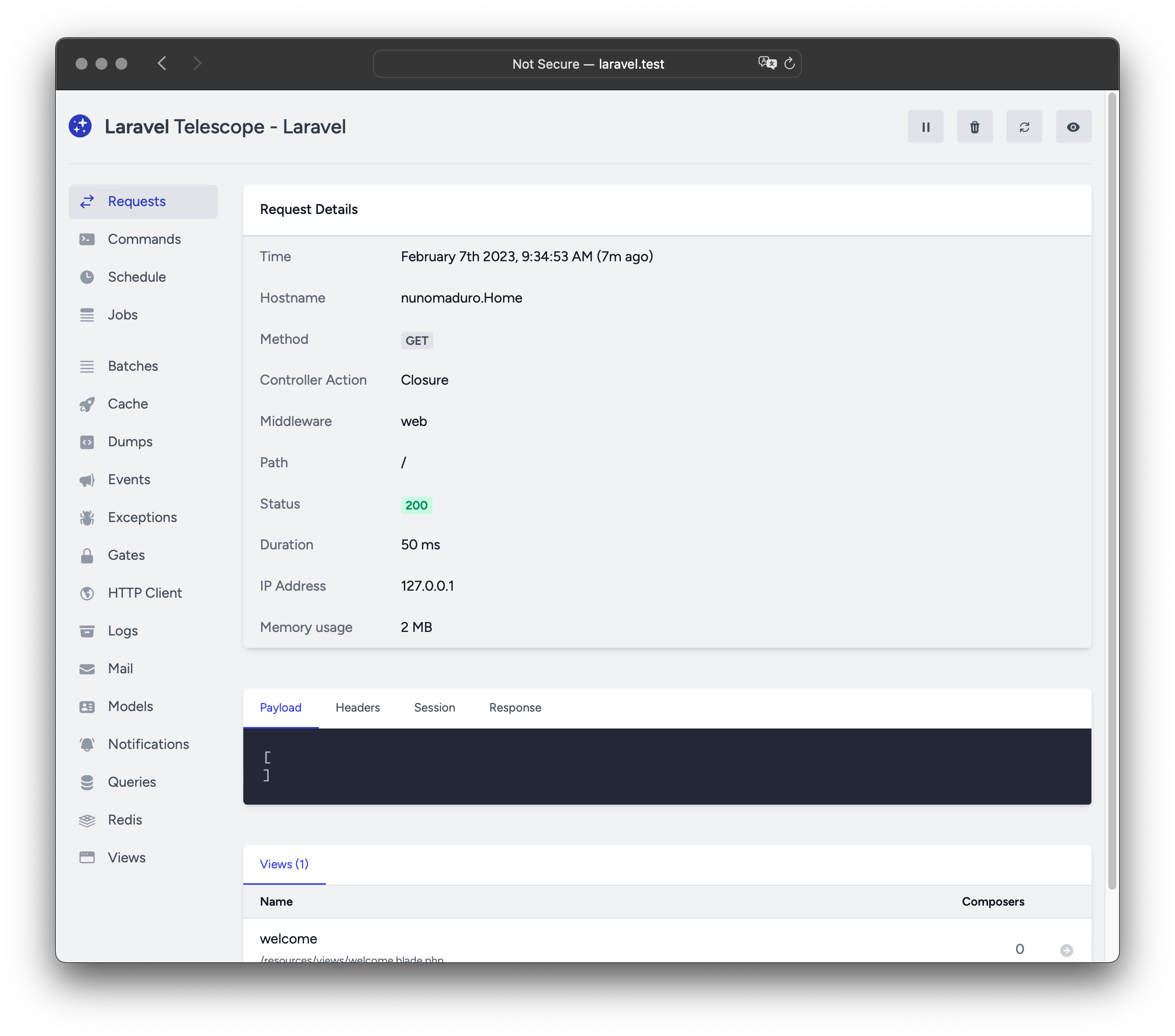
Laravel Telescope 是您本機 Laravel 開發環境絕佳的好幫手。Telescope 能深入瞭解進入應用程式的請求、例外狀況、日誌條目、資料庫查詢、佇列任務、郵件、通知、快取操作、排程任務、變數傾印等資訊。
安裝
您可以使用 Composer 套件管理器將 Telescope 安裝到您的 Laravel 專案中:
composer require laravel/telescope安裝 Telescope 後,請使用 telescope:install Artisan 指令發布其靜態資源與遷移檔。安裝 Telescope 後,您還應該執行 migrate 指令,以建立儲存 Telescope 資料所需的資料表:
php artisan telescope:install

php artisan migrate最後,您可以透過 /telescope 路由存取 Telescope 儀表板。
僅限本機安裝
如果您打算僅使用 Telescope 來輔助本機開發,可以使用 --dev 標誌來安裝 Telescope:
composer require laravel/telescope --dev

php artisan telescope:install

php artisan migrate執行 telescope:install 後,您應該從應用程式的 bootstrap/providers.php 設定檔中移除 TelescopeServiceProvider 服務提供者(Service Providers)的註冊。改為在 App\Providers\AppServiceProvider 類別的 register 方法中手動註冊 Telescope 的服務提供者(Service Providers)。我們會在註冊服務提供者(Service Providers)之前,先確認當前環境為 local:
/**
 * Register any application services.
 */
public function register(): void
{
    if ($this->app->environment('local') && class_exists(\Laravel\Telescope\TelescopeServiceProvider::class)) {
        $this->app->register(\Laravel\Telescope\TelescopeServiceProvider::class);
        $this->app->register(TelescopeServiceProvider::class);
    }
}最後,您還應該將以下內容新增到 composer.json 檔案中,以防止 Telescope 套件被自動偵測:
"extra": {
    "laravel": {
        "dont-discover": [
            "laravel/telescope"
        ]
    }
},設定
發布 Telescope 的靜態資源後,其主要設定檔將位於 config/telescope.php。此設定檔允許您設定 watcher 選項。每個設定選項都包含其用途的說明,因此請務必深入探索此檔案。
如果需要,您可以使用 enabled 設定選項完全停用 Telescope 的資料收集:
'enabled' => env('TELESCOPE_ENABLED', true),內容安全策略 (CSP) Nonce
如果您想在 Telescope 視圖使用的 script 和 style 標籤上使用 nonce 屬性來作為 內容安全策略 的一部分,您可以使用 Telescope::cspNonce 方法來指定要使用的 nonce。通常應在中介層內呼叫此方法,以便為每個請求指派新的 nonce:
use Closure;
use Illuminate\Http\Request;
use Laravel\Telescope\Telescope;
use Symfony\Component\HttpFoundation\Response;

public function handle(Request $request, Closure $next): Response
{
    Telescope::cspNonce('csp-nonce');

    return $next($request);
}您可以將此中介層新增至應用程式的 config/telescope.php 設定檔中的 middleware 選項:
'middleware' => [
    'web',
    App\Http\Middleware\AddTelescopeCspNonce::class,
    Authorize::class,
],資料修剪
如果沒有修剪,telescope_entries 資料表會非常快速地累積紀錄。為了緩解這個問題,您應該排程 telescope:prune Artisan 指令每日執行:
use Illuminate\Support\Facades\Schedule;

Schedule::command('telescope:prune')->daily();預設情況下,所有超過 24 小時的條目都會被修剪。呼叫指令時,您可以使用 hours 選項來決定 Telescope 資料要保留多久。例如,以下指令將刪除所有超過 48 小時前建立的紀錄:
use Illuminate\Support\Facades\Schedule;

Schedule::command('telescope:prune --hours=48')->daily();儀表板授權
Telescope 儀表板可透過 /telescope 路由存取。預設情況下,您只能在 local 環境中存取此儀表板。在您的 app/Providers/TelescopeServiceProvider.php 檔案中,有一個授權 gate 的定義。這個授權 gate 用於控制在非本機環境中對 Telescope 的存取權限。您可以根據需要隨意修改此 gate,以限制對您 Telescope 的存取:
use App\Models\User;

/**
 * Register the Telescope gate.
 *
 * This gate determines who can access Telescope in non-local environments.
 */
protected function gate(): void
{
    Gate::define('viewTelescope', function (User $user) {
        return in_array($user->email, [
            '[email protected]',
        ]);
    });
}⚠️ 警告
您應該確保在正式環境中將 APP_ENV 環境變數修改為 production。否則,您的 Telescope 將會公開供任何人存取。
升級 Telescope
當升級到 Telescope 的新主要版本時,仔細閱讀升級指南是非常重要的。
此外,在升級到任何新的 Telescope 版本時,您應該重新發布 Telescope 的靜態資源:
php artisan telescope:publish為了保持靜態資源為最新狀態並避免未來的更新出現問題,您可以在應用程式的 composer.json 檔案中的 post-update-cmd 腳本中加入 vendor:publish --tag=laravel-assets 指令:
{
    "scripts": {
        "post-update-cmd": [
            "@php artisan vendor:publish --tag=laravel-assets --ansi --force"
        ]
    }
}過濾
條目
您可以透過在 App\Providers\TelescopeServiceProvider 類別中定義的 filter 閉包,來過濾由 Telescope 所記錄的資料。預設情況下,此閉包會在 local 環境中記錄所有資料,而在所有其他環境中則只會記錄例外狀況、失敗的任務、預定任務以及帶有監控標籤的資料:
use Laravel\Telescope\IncomingEntry;
use Laravel\Telescope\Telescope;

/**
 * Register any application services.
 */
public function register(): void
{
    $this->hideSensitiveRequestDetails();

    Telescope::filter(function (IncomingEntry $entry) {
        if ($this->app->environment('local')) {
            return true;
        }

        return $entry->isReportableException() ||
            $entry->isFailedJob() ||
            $entry->isScheduledTask() ||
            $entry->isSlowQuery() ||
            $entry->hasMonitoredTag();
    });
}批次
雖然 filter 閉包是用於過濾單一條目的資料,但您可以使用 filterBatch 方法來註冊一個閉包,藉此過濾特定請求或主控台指令的所有資料。若該閉包回傳 true,則所有條目都會被 Telescope 記錄下來:
use Illuminate\Support\Collection;
use Laravel\Telescope\IncomingEntry;
use Laravel\Telescope\Telescope;

/**
 * Register any application services.
 */
public function register(): void
{
    $this->hideSensitiveRequestDetails();

    Telescope::filterBatch(function (Collection $entries) {
        if ($this->app->environment('local')) {
            return true;
        }

        return $entries->contains(function (IncomingEntry $entry) {
            return $entry->isReportableException() ||
                $entry->isFailedJob() ||
                $entry->isScheduledTask() ||
                $entry->isSlowQuery() ||
                $entry->hasMonitoredTag();
            });
    });
}標籤
Telescope 允許您透過「標籤 (Tag)」來搜尋條目。通常,標籤會是 Eloquent 模型類別名稱或已認證的使用者 ID,Telescope 會自動將這些標籤附加到條目上。有時候,您可能希望為條目附加自訂標籤。若要實現這一點,您可以使用 Telescope::tag 方法。tag 方法接收一個閉包,該閉包應回傳一個標籤陣列。閉包回傳的標籤將會與 Telescope 自動附加到條目的任何標籤進行合併。通常,您應該在 App\Providers\TelescopeServiceProvider 類別的 register 方法內呼叫 tag 方法:
use Laravel\Telescope\EntryType;
use Laravel\Telescope\IncomingEntry;
use Laravel\Telescope\Telescope;

/**
 * Register any application services.
 */
public function register(): void
{
    $this->hideSensitiveRequestDetails();

    Telescope::tag(function (IncomingEntry $entry) {
        return $entry->type === EntryType::REQUEST
            ? ['status:'.$entry->content['response_status']]
            : [];
    });
}可用的 Watcher
Telescope 的「Watcher」會在執行請求或主控台命令時收集應用程式資料。您可以在 config/telescope.php 設定檔中自訂想要啟用的 Watcher 列表:
'watchers' => [
    Watchers\CacheWatcher::class => true,
    Watchers\CommandWatcher::class => true,
    // ...
],某些 Watcher 還允許您提供額外的自訂選項:
'watchers' => [
    Watchers\QueryWatcher::class => [
        'enabled' => env('TELESCOPE_QUERY_WATCHER', true),
        'slow' => 100,
    ],
    // ...
],Batch Watcher
Batch Watcher 會記錄有關佇列批次的資訊,包括任務與連線資訊。
Cache Watcher
Cache Watcher 會在快取金鑰命中 (hit)、未命中 (miss)、更新與忘記 (forget) 時記錄資料。
Command Watcher
Command Watcher 會在每次執行 Artisan 命令時記錄其引數、選項、結束代碼 (exit code) 與輸出。如果您想排除某些命令不被 Watcher 記錄,可在 config/telescope.php 檔案中的 ignore 選項中指定該命令:
'watchers' => [
    Watchers\CommandWatcher::class => [
        'enabled' => env('TELESCOPE_COMMAND_WATCHER', true),
        'ignore' => ['key:generate'],
    ],
    // ...
],Dump Watcher
Dump Watcher 會在 Telescope 中記錄並顯示您的變數轉儲 (dump)。使用 Laravel 時,可以使用全域 dump 函式轉儲變數。必須在瀏覽器中開啟 Dump Watcher 分頁才能記錄轉儲,否則 Watcher 將會忽略這些轉儲。
Event Watcher
Event Watcher 會記錄應用程式發送的任何事件的有效載荷 (payload)、監聽器 (listener) 與廣播資料。Laravel 框架的內部事件會被 Event Watcher 忽略。
Exception Watcher
Exception Watcher 會記錄應用程式拋出的任何可回報異常 (exception) 的資料與堆疊追蹤 (stack trace)。
Gate Watcher
Gate Watcher 會記錄應用程式進行 Gate 與 Policy 檢查的資料與結果。如果您想排除某些能力 (ability) 不被 Watcher 記錄,可以在 config/telescope.php 檔案中的 ignore_abilities 選項中指定:
'watchers' => [
    Watchers\GateWatcher::class => [
        'enabled' => env('TELESCOPE_GATE_WATCHER', true),
        'ignore_abilities' => ['viewNova'],
    ],
    // ...
],HTTP Client Watcher
HTTP Client Watcher 會記錄應用程式發出的對外 HTTP 用戶端請求。
Job Watcher
Job Watcher 會記錄應用程式派發的任何任務的資料與狀態。
Log Watcher
Log Watcher 會記錄應用程式寫入的任何日誌資料。
預設情況下,Telescope 只會記錄 error 等級及以上的日誌。但是,您可以透過修改應用程式 config/telescope.php 設定檔中的 level 選項來改變此行為:
'watchers' => [
    Watchers\LogWatcher::class => [
        'enabled' => env('TELESCOPE_LOG_WATCHER', true),
        'level' => 'debug',
    ],

    // ...
],Mail Watcher
Mail Watcher 允許您在瀏覽器中預覽應用程式發送的電子郵件及其相關資料。您還可以將電子郵件下載為 .eml 檔案。
Model Watcher
Model Watcher 會在發送 Eloquent 模型事件時記錄模型變更。您可以透過 Watcher 的 events 選項指定應記錄哪些模型事件:
'watchers' => [
    Watchers\ModelWatcher::class => [
        'enabled' => env('TELESCOPE_MODEL_WATCHER', true),
        'events' => ['eloquent.created*', 'eloquent.updated*'],
    ],
    // ...
],如果您想記錄在給定請求期間水合 (hydrated) 的模型數量,請啟用 hydrations 選項:
'watchers' => [
    Watchers\ModelWatcher::class => [
        'enabled' => env('TELESCOPE_MODEL_WATCHER', true),
        'events' => ['eloquent.created*', 'eloquent.updated*'],
        'hydrations' => true,
    ],
    // ...
],Notification Watcher
Notification Watcher 會記錄應用程式發送的所有通知。如果該通知觸發了電子郵件且您啟用了 Mail Watcher,則該電子郵件也可以在 Mail Watcher 畫面上預覽。
Query Watcher
Query Watcher 會記錄應用程式執行的所有查詢的原生 SQL、綁定引數與執行時間。該 Watcher 還會將慢於 100 毫秒的任何查詢標記為 slow。您可以透過 Watcher 的 slow 選項自訂慢查詢的門檻值:
'watchers' => [
    Watchers\QueryWatcher::class => [
        'enabled' => env('TELESCOPE_QUERY_WATCHER', true),
        'slow' => 50,
    ],
    // ...
],Redis Watcher
Redis Watcher 會記錄應用程式執行的所有 Redis 命令。如果您使用 Redis 進行快取,快取命令也會被 Redis Watcher 記錄。
Request Watcher
Request Watcher 會記錄與應用程式處理的任何請求相關聯的請求、標頭 (header)、Session 與回應資料。您可以透過 size_limit (以 KB 為單位) 選項限制記錄的回應資料大小:
'watchers' => [
    Watchers\RequestWatcher::class => [
        'enabled' => env('TELESCOPE_REQUEST_WATCHER', true),
        'size_limit' => env('TELESCOPE_RESPONSE_SIZE_LIMIT', 64),
    ],
    // ...
],Schedule Watcher
Schedule Watcher 會記錄應用程式執行的任何預定任務的命令與輸出。
View Watcher
View Watcher 會記錄渲染視圖時使用的視圖名稱、路徑、資料與「Composer」。
顯示使用者頭像
Telescope 儀表板會顯示在儲存給定條目時已通過認證使用者的頭像。預設情況下,Telescope 將使用 Gravatar 網路服務取得頭像。然而,您可以透過在 App\Providers\TelescopeServiceProvider 類別中註冊回呼函式來自訂頭像 URL。該回呼將接收使用者的 ID 與電子郵件地址,並應回傳使用者的頭像圖片 URL:
use App\Models\User;
use Laravel\Telescope\Telescope;

/**
 * Register any application services.
 */
public function register(): void
{
    // ...

    Telescope::avatar(function (?string $id, ?string $email) {
        return ! is_null($id)
            ? '/avatars/'.User::find($id)->avatar_path
            : '/generic-avatar.jpg';
    });
}