提示
簡介
Laravel Prompts 是一個 PHP 套件,可為您的命令列應用程式添加美觀且使用者友善的表單,並提供包含預留文字 (placeholder text) 與驗證在內的類瀏覽器功能。
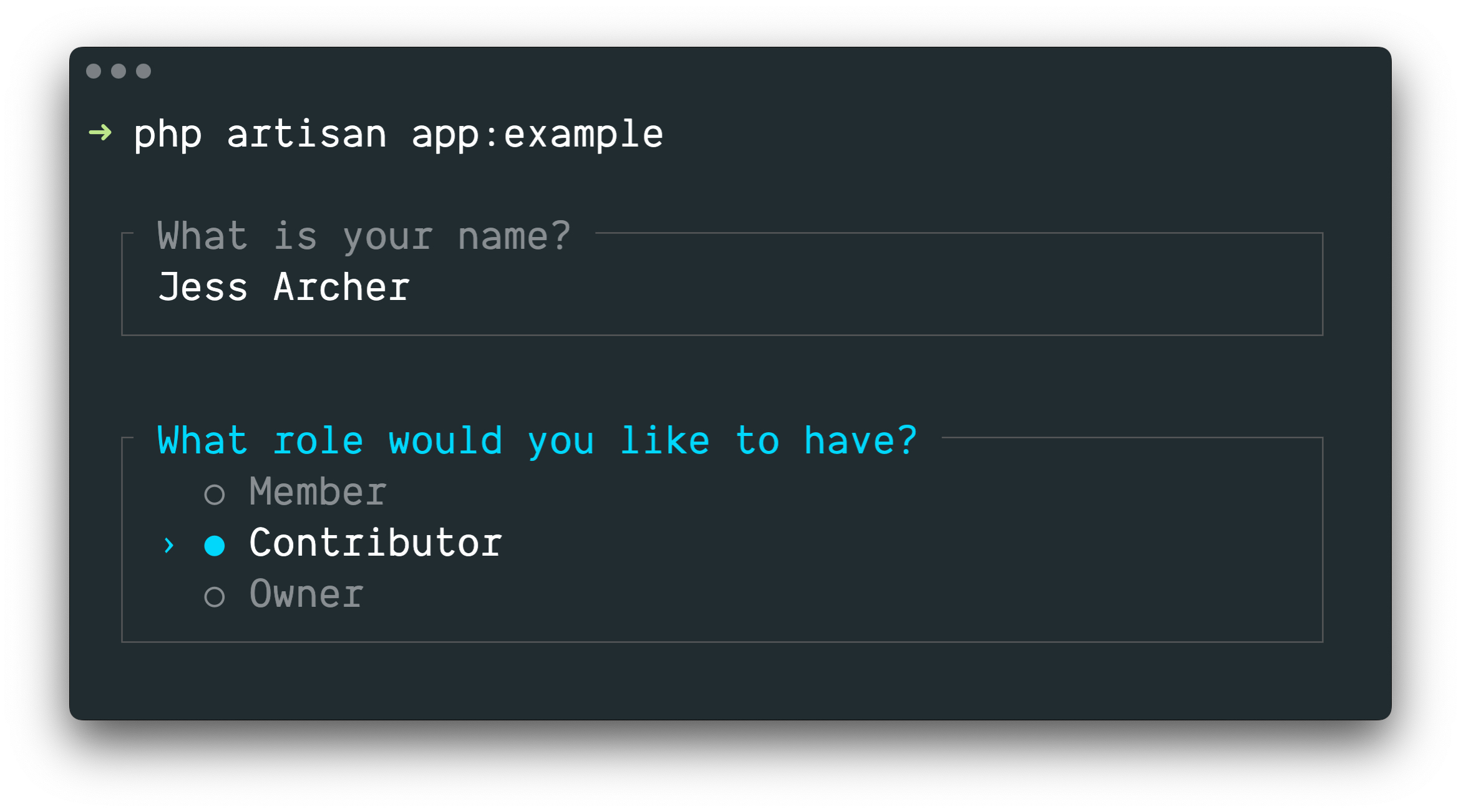
Laravel Prompts 非常適合在您的 Artisan 主控台命令 中接收使用者輸入,但它也可以用於任何命令列 PHP 專案。
📌 備註
Laravel Prompts 支援 macOS、Linux 以及搭載 WSL 的 Windows。欲了解更多資訊,請參閱我們關於 不支援的環境與後備方案 的文件。
安裝
Laravel Prompts 已包含在最新版本的 Laravel 中。
您也可以使用 Composer 套件管理工具將 Laravel Prompts 安裝到其他 PHP 專案中:
composer require laravel/prompts可用的提示
文字
text 函式會向使用者提示給定的問題,接收其輸入,然後將其回傳:
use function Laravel\Prompts\text;

$name = text('What is your name?');您也可以包含預留位置文字 (placeholder text)、預設值以及資訊提示:
$name = text(
    label: 'What is your name?',
    placeholder: 'E.g. Taylor Otwell',
    default: $user?->name,
    hint: 'This will be displayed on your profile.'
);必要值
如果您要求必須輸入值,可以傳遞 required 引數:
$name = text(
    label: 'What is your name?',
    required: true
);如果您想要自訂驗證訊息,也可以傳遞一個字串:
$name = text(
    label: 'What is your name?',
    required: 'Your name is required.'
);額外驗證
最後,如果您想要執行額外的驗證邏輯,可以將閉包 (closure) 傳遞給 validate 引數:
$name = text(
    label: 'What is your name?',
    validate: fn (string $value) => match (true) {
        strlen($value) < 3 => 'The name must be at least 3 characters.',
        strlen($value) > 255 => 'The name must not exceed 255 characters.',
        default => null
    }
);該閉包將接收已輸入的值,並可在驗證失敗時回傳錯誤訊息,若驗證通過則回傳 null。
或者,您也可以利用 Laravel 驗證器 (validator) 的強大功能。若要這樣做,請向 validate 引數提供一個包含屬性名稱和所需驗證規則的陣列:
$name = text(
    label: 'What is your name?',
    validate: ['name' => 'required|max:255|unique:users']
);文字區域
textarea 函式會向使用者提示給定的問題,透過多行文字區域接收其輸入,然後將其回傳:
use function Laravel\Prompts\textarea;

$story = textarea('Tell me a story.');您也可以包含預留位置文字、預設值以及資訊提示:
$story = textarea(
    label: 'Tell me a story.',
    placeholder: 'This is a story about...',
    hint: 'This will be displayed on your profile.'
);必要值
如果您要求必須輸入值,可以傳遞 required 引數:
$story = textarea(
    label: 'Tell me a story.',
    required: true
);如果您想要自訂驗證訊息,也可以傳遞一個字串:
$story = textarea(
    label: 'Tell me a story.',
    required: 'A story is required.'
);額外驗證
最後,如果您想要執行額外的驗證邏輯,可以將閉包傳遞給 validate 引數:
$story = textarea(
    label: 'Tell me a story.',
    validate: fn (string $value) => match (true) {
        strlen($value) < 250 => 'The story must be at least 250 characters.',
        strlen($value) > 10000 => 'The story must not exceed 10,000 characters.',
        default => null
    }
);該閉包將接收已輸入的值,並可在驗證失敗時回傳錯誤訊息,若驗證通過則回傳 null。
或者,您也可以利用 Laravel 驗證器 (validator) 的強大功能。若要這樣做,請向 validate 引數提供一個包含屬性名稱和所需驗證規則的陣列:
$story = textarea(
    label: 'Tell me a story.',
    validate: ['story' => 'required|max:10000']
);數字
number 函式會向使用者提示給定的問題,接收其數字輸入,然後將其回傳。number 函式允許使用者使用向上和向下的方向鍵來操作數字:
use function Laravel\Prompts\number;

$number = number('How many copies would you like?');您也可以包含預留位置文字、預設值以及資訊提示:
$name = number(
    label: 'How many copies would you like?',
    placeholder: '5',
    default: 1,
    hint: 'This will be determine how many copies to create.'
);必要值
如果您要求必須輸入值,可以傳遞 required 引數:
$copies = number(
    label: 'How many copies would you like?',
    required: true
);如果您想要自訂驗證訊息,也可以傳遞一個字串:
$copies = number(
    label: 'How many copies would you like?',
    required: 'A number of copies is required.'
);額外驗證
最後,如果您想要執行額外的驗證邏輯,可以將閉包傳遞給 validate 引數:
$copies = number(
    label: 'How many copies would you like?',
    validate: fn (?int $value) => match (true) {
        $value < 1 => 'At least one copy is required.',
        $value > 100 => 'You may not create more than 100 copies.',
        default => null
    }
);該閉包將接收已輸入的值,並可在驗證失敗時回傳錯誤訊息,若驗證通過則回傳 null。
或者,您也可以利用 Laravel 驗證器 (validator) 的強大功能。若要這樣做,請向 validate 引數提供一個包含屬性名稱和所需驗證規則的陣列:
$copies = number(
    label: 'How many copies would you like?',
    validate: ['copies' => 'required|integer|min:1|max:100']
);密碼
password 函式與 text 函式類似,但在使用者於主控台輸入時,輸入內容會被遮蔽。這在詢問密碼等敏感資訊時非常有用:
use function Laravel\Prompts\password;

$password = password('What is your password?');您也可以包含預留位置文字以及資訊提示:
$password = password(
    label: 'What is your password?',
    placeholder: 'password',
    hint: 'Minimum 8 characters.'
);必要值
如果您要求必須輸入值,可以傳遞 required 引數:
$password = password(
    label: 'What is your password?',
    required: true
);如果您想要自訂驗證訊息,也可以傳遞一個字串:
$password = password(
    label: 'What is your password?',
    required: 'The password is required.'
);額外驗證
最後,如果您想要執行額外的驗證邏輯,可以將閉包傳遞給 validate 引數:
$password = password(
    label: 'What is your password?',
    validate: fn (string $value) => match (true) {
        strlen($value) < 8 => 'The password must be at least 8 characters.',
        default => null
    }
);該閉包將接收已輸入的值,並可在驗證失敗時回傳錯誤訊息,若驗證通過則回傳 null。
或者,您也可以利用 Laravel 驗證器 (validator) 的強大功能。若要這樣做,請向 validate 引數提供一個包含屬性名稱和所需驗證規則的陣列:
$password = password(
    label: 'What is your password?',
    validate: ['password' => 'min:8']
);確認
如果您需要詢問使用者「是或否」的確認,可以使用 confirm 函式。使用者可以使用方向鍵或按下 y 或 n 來選擇他們的回答。此函式將回傳 true 或 false。
use function Laravel\Prompts\confirm;

$confirmed = confirm('Do you accept the terms?');您也可以包含預設值、「是」與「否」標籤的自訂文字,以及一個資訊提示:
$confirmed = confirm(
    label: 'Do you accept the terms?',
    default: false,
    yes: 'I accept',
    no: 'I decline',
    hint: 'The terms must be accepted to continue.'
);要求選擇「是」
如果有必要,您可以透過傳遞 required 引數來要求使用者必須選擇「是」:
$confirmed = confirm(
    label: 'Do you accept the terms?',
    required: true
);如果您想要自訂驗證訊息,也可以傳遞一個字串:
$confirmed = confirm(
    label: 'Do you accept the terms?',
    required: 'You must accept the terms to continue.'
);選擇
如果您需要使用者從一組預定義的選項中進行選擇,可以使用 select 函式:
use function Laravel\Prompts\select;

$role = select(
    label: 'What role should the user have?',
    options: ['Member', 'Contributor', 'Owner']
);您也可以指定預設選項和一個資訊提示:
$role = select(
    label: 'What role should the user have?',
    options: ['Member', 'Contributor', 'Owner'],
    default: 'Owner',
    hint: 'The role may be changed at any time.'
);您也可以將關聯陣列傳遞給 options 引數,以便回傳所選的鍵 (key) 而非其值 (value):
$role = select(
    label: 'What role should the user have?',
    options: [
        'member' => 'Member',
        'contributor' => 'Contributor',
        'owner' => 'Owner',
    ],
    default: 'owner'
);列表在開始捲動前會顯示最多五個選項。您可以透過傳遞 scroll 引數來自訂此設定:
$role = select(
    label: 'Which category would you like to assign?',
    options: Category::pluck('name', 'id'),
    scroll: 10
);次要資訊
info 引數可用於顯示關於目前高亮選項的附加資訊。當提供一個閉包 (closure) 時,它將接收目前高亮選項的值,並應回傳一個字串或 null:
$role = select(
    label: 'What role should the user have?',
    options: [
        'member' => 'Member',
        'contributor' => 'Contributor',
        'owner' => 'Owner',
    ],
    info: fn (string $value) => match ($value) {
        'member' => 'Can view and comment.',
        'contributor' => 'Can view, comment, and edit.',
        'owner' => 'Full access to all resources.',
        default => null,
    }
);如果資訊不依賴於高亮選項,您也可以將靜態字串傳遞給 info 引數:
$role = select(
    label: 'What role should the user have?',
    options: ['Member', 'Contributor', 'Owner'],
    info: 'The role may be changed at any time.'
);附加驗證
與其他提示函式不同,select 函式不接受 required 引數,因為使用者不可能不選擇任何內容。然而,如果您需要呈現某個選項但防止其被選擇,您可以將閉包傳遞給 validate 引數:
$role = select(
    label: 'What role should the user have?',
    options: [
        'member' => 'Member',
        'contributor' => 'Contributor',
        'owner' => 'Owner',
    ],
    validate: fn (string $value) =>
        $value === 'owner' && User::where('role', 'owner')->exists()
            ? 'An owner already exists.'
            : null
);如果 options 引數是一個關聯陣列,則閉包將接收所選的鍵;否則,它將接收所選的值。閉包可以回傳錯誤訊息,或者在驗證通過時回傳 null。
多選
如果您需要使用者能夠選擇多個選項,可以使用 multiselect 函式:
use function Laravel\Prompts\multiselect;

$permissions = multiselect(
    label: 'What permissions should be assigned?',
    options: ['Read', 'Create', 'Update', 'Delete']
);您也可以指定預設選項和一個資訊提示:
use function Laravel\Prompts\multiselect;

$permissions = multiselect(
    label: 'What permissions should be assigned?',
    options: ['Read', 'Create', 'Update', 'Delete'],
    default: ['Read', 'Create'],
    hint: 'Permissions may be updated at any time.'
);您也可以將關聯陣列傳遞給 options 引數,以便回傳所選選項的鍵而非其值:
$permissions = multiselect(
    label: 'What permissions should be assigned?',
    options: [
        'read' => 'Read',
        'create' => 'Create',
        'update' => 'Update',
        'delete' => 'Delete',
    ],
    default: ['read', 'create']
);列表在開始捲動前會顯示最多五個選項。您可以透過傳遞 scroll 引數來自訂此設定:
$categories = multiselect(
    label: 'What categories should be assigned?',
    options: Category::pluck('name', 'id'),
    scroll: 10
);次要資訊
info 引數可用於顯示關於目前高亮選項的附加資訊。當提供一個閉包時,它將接收目前高亮選項的值,並應回傳一個字串或 null:
$permissions = multiselect(
    label: 'What permissions should be assigned?',
    options: [
        'read' => 'Read',
        'create' => 'Create',
        'update' => 'Update',
        'delete' => 'Delete',
    ],
    info: fn (string $value) => match ($value) {
        'read' => 'View resources and their properties.',
        'create' => 'Create new resources.',
        'update' => 'Modify existing resources.',
        'delete' => 'Permanently remove resources.',
        default => null,
    }
);要求必填
預設情況下,使用者可以選擇零個或多個選項。您可以傳遞 required 引數來強制要求選擇一個或多個選項:
$categories = multiselect(
    label: 'What categories should be assigned?',
    options: Category::pluck('name', 'id'),
    required: true
);如果您想要自訂驗證訊息,可以向 required 引數提供一個字串:
$categories = multiselect(
    label: 'What categories should be assigned?',
    options: Category::pluck('name', 'id'),
    required: 'You must select at least one category'
);附加驗證
如果您需要呈現某個選項但防止其被選擇,您可以將閉包傳遞給 validate 引數:
$permissions = multiselect(
    label: 'What permissions should the user have?',
    options: [
        'read' => 'Read',
        'create' => 'Create',
        'update' => 'Update',
        'delete' => 'Delete',
    ],
    validate: fn (array $values) => ! in_array('read', $values)
        ? 'All users require the read permission.'
        : null
);如果 options 引數是一個關聯陣列,則閉包將接收所選的鍵;否則,它將接收所選的值。閉包可以回傳錯誤訊息,或者在驗證通過時回傳 null。
建議
suggest 函數可用於為可能的選項提供自動完成功能。無論自動完成提示為何,使用者仍然可以提供任何答案:
use function Laravel\Prompts\suggest;

$name = suggest('What is your name?', ['Taylor', 'Dayle']);或者,您也可以將閉包作為 suggest 函數的第二個引數。每當使用者輸入一個字元時,該閉包就會被呼叫。該閉包應接收一個包含目前使用者輸入內容的字串參數,並回傳一個用於自動完成的選項陣列:
$name = suggest(
    label: 'What is your name?',
    options: fn ($value) => collect(['Taylor', 'Dayle'])
        ->filter(fn ($name) => Str::contains($name, $value, ignoreCase: true))
)您也可以包含佔位文字、預設值以及資訊提示:
$name = suggest(
    label: 'What is your name?',
    options: ['Taylor', 'Dayle'],
    placeholder: 'E.g. Taylor',
    default: $user?->name,
    hint: 'This will be displayed on your profile.'
);次要資訊
info 引數可用於顯示關於目前高亮選項的額外資訊。當提供閉包時,它將接收目前高亮選項的值,並應回傳一個字串或 null:
$name = suggest(
    label: 'What is your name?',
    options: ['Taylor', 'Dayle'],
    info: fn (string $value) => match ($value) {
        'Taylor' => 'Administrator',
        'Dayle' => 'Contributor',
        default => null,
    }
);必填值
如果您要求必須輸入值,可以傳遞 required 引數:
$name = suggest(
    label: 'What is your name?',
    options: ['Taylor', 'Dayle'],
    required: true
);如果您想要自訂驗證訊息,也可以傳遞一個字串:
$name = suggest(
    label: 'What is your name?',
    options: ['Taylor', 'Dayle'],
    required: 'Your name is required.'
);額外驗證
最後,如果您想要執行額外的驗證邏輯,可以將閉包傳遞給 validate 引數:
$name = suggest(
    label: 'What is your name?',
    options: ['Taylor', 'Dayle'],
    validate: fn (string $value) => match (true) {
        strlen($value) < 3 => 'The name must be at least 3 characters.',
        strlen($value) > 255 => 'The name must not exceed 255 characters.',
        default => null
    }
);該閉包將接收已輸入的值,並在驗證失敗時回傳錯誤訊息,若驗證通過則回傳 null。
或者,您可以使用 Laravel 驗證器(validator) 的強大功能。若要如此做,請向 validate 引數提供一個包含屬性名稱和所需驗證規則的陣列:
$name = suggest(
    label: 'What is your name?',
    options: ['Taylor', 'Dayle'],
    validate: ['name' => 'required|min:3|max:255']
);搜尋
如果您有許多選項供使用者選擇,search 函數允許使用者輸入搜尋查詢來篩選結果,然後再使用方向鍵選擇選項:
use function Laravel\Prompts\search;

$id = search(
    label: 'Search for the user that should receive the mail',
    options: fn (string $value) => strlen($value) > 0
        ? User::whereLike('name', "%{$value}%")->pluck('name', 'id')->all()
        : []
);該閉包將接收目前為止使用者輸入的文字,且必須回傳一個選項陣列。如果您回傳關聯陣列,則會回傳所選選項的鍵 (key);否則將回傳其值 (value)。
當您篩選陣列且打算回傳值時,應使用 array_values 函數或集合 (Collection) 的 values 方法,以確保陣列不會變成關聯陣列:
$names = collect(['Taylor', 'Abigail']);

$selected = search(
    label: 'Search for the user that should receive the mail',
    options: fn (string $value) => $names
        ->filter(fn ($name) => Str::contains($name, $value, ignoreCase: true))
        ->values()
        ->all(),
);您也可以包含佔位文字和資訊提示:
$id = search(
    label: 'Search for the user that should receive the mail',
    placeholder: 'E.g. Taylor Otwell',
    options: fn (string $value) => strlen($value) > 0
        ? User::whereLike('name', "%{$value}%")->pluck('name', 'id')->all()
        : [],
    hint: 'The user will receive an email immediately.'
);在列表開始捲動前,最多會顯示五個選項。您可以透過傳遞 scroll 引數來自訂此設定:
$id = search(
    label: 'Search for the user that should receive the mail',
    options: fn (string $value) => strlen($value) > 0
        ? User::whereLike('name', "%{$value}%")->pluck('name', 'id')->all()
        : [],
    scroll: 10
);次要資訊
info 引數可用於顯示關於目前高亮選項的額外資訊。當提供閉包時,它將接收目前高亮選項的值,並應回傳一個字串或 null:
$id = search(
    label: 'Search for the user that should receive the mail',
    options: fn (string $value) => strlen($value) > 0
        ? User::whereLike('name', "%{$value}%")->pluck('name', 'id')->all()
        : [],
    info: fn (int $userId) => User::find($userId)?->email
);額外驗證
如果您想要執行額外的驗證邏輯,可以將閉包傳遞給 validate 引數:
$id = search(
    label: 'Search for the user that should receive the mail',
    options: fn (string $value) => strlen($value) > 0
        ? User::whereLike('name', "%{$value}%")->pluck('name', 'id')->all()
        : [],
    validate: function (int|string $value) {
        $user = User::findOrFail($value);

        if ($user->opted_out) {
            return 'This user has opted-out of receiving mail.';
        }
    }
);如果 options 閉包回傳關聯陣列,則該閉包將接收所選的鍵;否則,它將接收所選的值。該閉包可以回傳錯誤訊息,若驗證通過則回傳 null。
多重搜尋
如果您有許多可搜尋的選項,且需要使用者能夠選擇多個項目,multisearch 函式允許使用者輸入搜尋查詢以篩選結果,然後使用方向鍵和空白鍵來選擇選項:
use function Laravel\Prompts\multisearch;

$ids = multisearch(
    'Search for the users that should receive the mail',
    fn (string $value) => strlen($value) > 0
        ? User::whereLike('name', "%{$value}%")->pluck('name', 'id')->all()
        : []
);該閉包將接收使用者目前為止所輸入的文字,且必須回傳一個選項陣列。如果您回傳一個關聯陣列,則會回傳所選選項的鍵 (key);否則,將回傳其值 (value)。
當您篩選一個打算回傳其值的陣列時,您應該使用 array_values 函式或 Collection 的 values 方法,以確保陣列不會變成關聯陣列:
$names = collect(['Taylor', 'Abigail']);

$selected = multisearch(
    label: 'Search for the users that should receive the mail',
    options: fn (string $value) => $names
        ->filter(fn ($name) => Str::contains($name, $value, ignoreCase: true))
        ->values()
        ->all(),
);您也可以包含佔位文字和資訊提示:
$ids = multisearch(
    label: 'Search for the users that should receive the mail',
    placeholder: 'E.g. Taylor Otwell',
    options: fn (string $value) => strlen($value) > 0
        ? User::whereLike('name', "%{$value}%")->pluck('name', 'id')->all()
        : [],
    hint: 'The user will receive an email immediately.'
);在清單開始捲動前,最多會顯示五個選項。您可以透過傳遞 scroll 引數來自訂此設定:
$ids = multisearch(
    label: 'Search for the users that should receive the mail',
    options: fn (string $value) => strlen($value) > 0
        ? User::whereLike('name', "%{$value}%")->pluck('name', 'id')->all()
        : [],
    scroll: 10
);次要資訊
info 引數可用於顯示關於目前高亮選項的額外資訊。當提供閉包時,它將接收目前高亮選項的值,並應回傳一個字串或 null:
$ids = multisearch(
    label: 'Search for the users that should receive the mail',
    options: fn (string $value) => strlen($value) > 0
        ? User::whereLike('name', "%{$value}%")->pluck('name', 'id')->all()
        : [],
    info: fn (int $userId) => User::find($userId)?->email
);要求輸入值
預設情況下,使用者可以選擇零個或多個選項。您可以傳遞 required 引數來強制要求選擇一個或多個選項:
$ids = multisearch(
    label: 'Search for the users that should receive the mail',
    options: fn (string $value) => strlen($value) > 0
        ? User::whereLike('name', "%{$value}%")->pluck('name', 'id')->all()
        : [],
    required: true
);如果您想自訂驗證訊息,也可以為 required 引數提供一個字串:
$ids = multisearch(
    label: 'Search for the users that should receive the mail',
    options: fn (string $value) => strlen($value) > 0
        ? User::whereLike('name', "%{$value}%")->pluck('name', 'id')->all()
        : [],
    required: 'You must select at least one user.'
);額外驗證
如果您需要執行額外的驗證邏輯,可以將閉包傳遞給 validate 引數:
$ids = multisearch(
    label: 'Search for the users that should receive the mail',
    options: fn (string $value) => strlen($value) > 0
        ? User::whereLike('name', "%{$value}%")->pluck('name', 'id')->all()
        : [],
    validate: function (array $values) {
        $optedOut = User::whereLike('name', '%a%')->findMany($values);

        if ($optedOut->isNotEmpty()) {
            return $optedOut->pluck('name')->join(', ', ', and ').' have opted out.';
        }
    }
);如果 options 閉包回傳的是關聯陣列,則該閉包將接收所選的鍵;否則,它將接收所選的值。該閉包可以回傳錯誤訊息,或者在驗證通過時回傳 null。
暫停
pause 函式可用於向使用者顯示資訊文字,並等待他們按下 Enter / Return 鍵以確認要繼續操作:
use function Laravel\Prompts\pause;

pause('Press ENTER to continue.');自動完成
autocomplete 函式可用於為可能的選項提供行內自動完成。當使用者輸入時,與其輸入相匹配的建議將以虛擬文字 (ghost text) 的形式出現,使用者可以按下 Tab 或右方向鍵來接受建議:
use function Laravel\Prompts\autocomplete;

$name = autocomplete(
    label: 'What is your name?',
    options: ['Taylor', 'Dayle', 'Jess', 'Nuno', 'Tim']
);您也可以包含佔位文字、預設值和資訊提示:
$name = autocomplete(
    label: 'What is your name?',
    options: ['Taylor', 'Dayle', 'Jess', 'Nuno', 'Tim'],
    placeholder: 'E.g. Taylor',
    default: $user?->name,
    hint: 'Use tab to accept, up/down to cycle.'
);動態選項
您也可以傳遞一個閉包,根據使用者的輸入動態產生選項。每當使用者輸入一個字元時,該閉包都會被呼叫,且應回傳一個用於自動完成的選項陣列:
$file = autocomplete(
    label: 'Which file?',
    options: fn (string $value) => collect($files)
        ->filter(fn ($file) => str_starts_with(strtolower($file), strtolower($value)))
        ->values()
        ->all(),
);要求輸入值
如果您要求必須輸入值,可以傳遞 required 引數:
$name = autocomplete(
    label: 'What is your name?',
    options: ['Taylor', 'Dayle', 'Jess', 'Nuno', 'Tim'],
    required: true
);如果您想自訂驗證訊息,也可以傳遞一個字串:
$name = autocomplete(
    label: 'What is your name?',
    options: ['Taylor', 'Dayle', 'Jess', 'Nuno', 'Tim'],
    required: 'Your name is required.'
);額外驗證
最後,如果您需要執行額外的驗證邏輯,可以將閉包傳遞給 validate 引數:
$name = autocomplete(
    label: 'What is your name?',
    options: ['Taylor', 'Dayle', 'Jess', 'Nuno', 'Tim'],
    validate: fn (string $value) => match (true) {
        strlen($value) < 3 => 'The name must be at least 3 characters.',
        strlen($value) > 255 => 'The name must not exceed 255 characters.',
        default => null
    }
);該閉包將接收已輸入的值,並可以回傳錯誤訊息,或者在驗證通過時回傳 null。
在驗證前轉換輸入
有時候您可能希望在進行驗證之前轉換提示輸入。例如,您可能希望移除任何提供字串的空白字元。為了實現這一點,許多提示函式提供了一個 transform 引數,它接受一個閉包 (closure):
$name = text(
    label: 'What is your name?',
    transform: fn (string $value) => trim($value),
    validate: fn (string $value) => match (true) {
        strlen($value) < 3 => 'The name must be at least 3 characters.',
        strlen($value) > 255 => 'The name must not exceed 255 characters.',
        default => null
    }
);表單
通常,您會有複數個提示會依序顯示,以便在執行額外動作之前收集資訊。您可以使用 form 函式來建立一組分組的提示讓使用者完成:
use function Laravel\Prompts\form;

$responses = form()
    ->text('What is your name?', required: true)
    ->password('What is your password?', validate: ['password' => 'min:8'])
    ->confirm('Do you accept the terms?')
->submit();submit 方法將回傳一個以數字為索引的陣列,其中包含來自表單提示的所有回應。然而,您可以透過 name 引數為每個提示提供名稱。當提供了名稱時,可以透過該名稱存取具名提示的回應:
use App\Models\User;
use function Laravel\Prompts\form;

$responses = form()
    ->text('What is your name?', required: true, name: 'name')
    ->password(
        label: 'What is your password?',
        validate: ['password' => 'min:8'],
        name: 'password'
    )
    ->confirm('Do you accept the terms?')
    ->submit();

User::create([
    'name' => $responses['name'],
    'password' => $responses['password'],
]);使用 form 函式的主要好處是使用者可以使用 CTRL + U 回到表單中的先前提示。這讓使用者能夠修正錯誤或更改選擇,而無需取消並重新開始整個表單。
如果您需要對表單中的提示進行更精細的控制,您可以調用 add 方法,而不是直接調用提示函式。add 方法會接收使用者提供的所有先前回應:
use function Laravel\Prompts\form;
use function Laravel\Prompts\outro;
use function Laravel\Prompts\text;

$responses = form()
    ->text('What is your name?', required: true, name: 'name')
    ->add(function ($responses) {
        return text("How old are you, {$responses['name']}?");
    }, name: 'age')
    ->submit();

outro("Your name is {$responses['name']} and you are {$responses['age']} years old.");資訊訊息
note、info、warning、error 和 alert 函式可用於顯示資訊訊息:
use function Laravel\Prompts\info;

info('Package installed successfully.');表格
table 函式讓您輕鬆顯示多行多列的資料。您只需要提供欄位名稱和表格的資料即可:
use function Laravel\Prompts\table;

table(
    headers: ['Name', 'Email'],
    rows: User::all(['name', 'email'])->toArray()
);旋轉圖示
spin 函式在執行指定的回呼 (callback) 時會顯示一個旋轉圖示以及一個可選的訊息。它用於指示正在進行的行程,並在完成時回傳回呼的結果:
use function Laravel\Prompts\spin;

$response = spin(
    callback: fn () => Http::get('http://example.com'),
    message: 'Fetching response...'
);⚠️ 警告
spin 函式需要 PCNTL PHP 擴充功能來使旋轉圖示產生動畫。當此擴充功能不可用時,將會顯示旋轉圖示的靜態版本。
進度條
對於執行時間較長的任務,顯示一個進度條來告知使用者任務的完成程度會很有幫助。使用 progress 函式,Laravel 將顯示一個進度條,並在每次迭代給定的可迭代值時推進其進度:
use function Laravel\Prompts\progress;

$users = progress(
    label: 'Updating users',
    steps: User::all(),
    callback: fn ($user) => $this->performTask($user)
);progress 函式的行為就像 map 函式,將回傳一個包含回呼每次迭代回傳值的陣列。
回呼也可以接收 Laravel\Prompts\Progress 實例,讓您在每次迭代時修改標籤和提示:
$users = progress(
    label: 'Updating users',
    steps: User::all(),
    callback: function ($user, $progress) {
        $progress
            ->label("Updating {$user->name}")
            ->hint("Created on {$user->created_at}");

        return $this->performTask($user);
    },
    hint: 'This may take some time.'
);有時候,您可能需要更手動地控制進度條如何推進。首先,定義行程將迭代的總步驟數。然後,在處理每個項目後,透過 advance 方法推進進度條:
$progress = progress(label: 'Updating users', steps: 10);

$users = User::all();

$progress->start();

foreach ($users as $user) {
    $this->performTask($user);

    $progress->advance();
}

$progress->finish();任務
task 函式會在給定的回呼函式執行期間,顯示一個帶有標籤的任務、旋轉圖示以及一個可捲動的即時輸出區域。它非常適合用於封裝執行時間較長的行程(例如安裝依賴套件或部署指令碼),以提供執行過程的即時可視化:
use function Laravel\Prompts\task;

task(
    label: 'Installing dependencies',
    callback: function ($logger) {
        // Long-running process...
    }
);該回呼函式會接收一個 Logger 實例,您可以使用它在任務的輸出區域中顯示日誌行、狀態訊息以及串流文字。
⚠️ 警告
task 函式需要 PCNTL PHP 擴展才能讓旋轉圖示產生動畫。當此擴展不可用時,將會顯示靜態版本的任務。
記錄日誌行
line 方法會將單行日誌寫入任務的可捲動輸出區域:
task(
    label: 'Installing dependencies',
    callback: function ($logger) {
        $logger->line('Resolving packages...');
        // ...
        $logger->line('Downloading laravel/framework');
        // ...
    }
);狀態訊息
您可以使用 success、warning 和 error 方法來顯示狀態訊息。這些訊息會以穩定且高亮的文字形式出現在可捲動日誌區域的上方:
task(
    label: 'Deploying application',
    callback: function ($logger) {
        $logger->line('Pulling latest changes...');
        // ...
        $logger->success('Changes pulled!');

        $logger->line('Running migrations...');
        // ...
        $logger->warning('No new migrations to run.');

        $logger->line('Clearing cache...');
        // ...
        $logger->success('Cache cleared!');
    }
);更新標籤
label 方法允許您在任務執行期間更新其標籤:
task(
    label: 'Starting deployment...',
    callback: function ($logger) {
        $logger->label('Pulling latest changes...');
        // ...
        $logger->label('Running migrations...');
        // ...
        $logger->label('Clearing cache...');
        // ...
    }
);串流文字
對於會逐步產生輸出的行程(例如 AI 產生的回覆),partial 方法允許您逐字或逐塊地串流文字。一旦串流完成,請呼叫 commitPartial 以完成輸出:
task(
    label: 'Generating response...',
    callback: function ($logger) {
        foreach ($words as $word) {
            $logger->partial($word . ' ');
        }

        $logger->commitPartial();
    }
);自定義輸出限制
預設情況下,任務會顯示最多 10 行的可捲動輸出。您可以使用 limit 引數來自定義此限制:
task(
    label: 'Installing dependencies',
    callback: function ($logger) {
        // ...
    },
    limit: 20
);串流
stream 函式會將文字串流至終端機,非常適合用於顯示 AI 產生的內容或任何逐步到達的文字:
use function Laravel\Prompts\stream;

$stream = stream();

foreach ($words as $word) {
    $stream->append($word . ' ');
    usleep(25_000); // Simulate delay between chunks...
}

$stream->close();append 方法將文字添加到串流中,並以逐漸淡入的效果進行渲染。當所有內容都串流完畢後,請呼叫 close 方法以完成輸出並恢復游標。
終端機標題
title 函式會更新使用者終端機視窗或分頁的標題:
use function Laravel\Prompts\title;

title('Installing Dependencies');若要將終端機標題重設為預設值,請傳入空字串:
title('');通知
notify 函式可從終端機發送原生桌面通知:
use function Laravel\Prompts\notify;

notify('Build Complete', 'Deployed to production');通知支援 macOS(透過 osascript)和 Linux(透過 notify-send 並以 kdialog 作為後備方案)。
在 macOS 上,您還可以包含 subtitle 和 sound:
notify(
    title: 'Build Complete',
    body: 'Deployed to production',
    subtitle: 'staging-server',
    sound: 'Glass',
);在 Linux 上,您可以提供自定義的 icon:
notify(
    title: 'Build Complete',
    body: 'Deployed to production',
    icon: '/path/to/icon.png',
);清除終端機
clear 函式可用於清除使用者的終端機:
use function Laravel\Prompts\clear;

clear();終端機注意事項
終端機寬度
如果任何標籤、選項或驗證訊息的長度超過使用者終端機的「欄位」數量,它將會被自動截斷以符合寬度。如果您的使用者可能會使用較窄的終端機,請考慮縮短這些字串的長度。通常安全的最高長度為 74 個字元,以支援 80 個字元的終端機。
終端機高度
對於任何接受 scroll 引數的提示,設定的值將會自動縮減以符合使用者終端機的高度,其中也包含了預留給驗證訊息的空間。
不支援的環境與後備方案
Laravel Prompts 支援 macOS、Linux 以及搭載 WSL 的 Windows。由於 Windows 版 PHP 的限制,目前無法在 WSL 以外的 Windows 環境中使用 Laravel Prompts。
因此,Laravel Prompts 支援後備至其他實作方案,例如 Symfony Console Question Helper。
📌 備註
當將 Laravel Prompts 與 Laravel 框架一起使用時,每個提示的後備方案都已經為您配置完成,並會在不支援的環境中自動啟用。
後備條件
如果您未使用 Laravel 或需要自定義何時使用後備行為,您可以將布林值傳遞給 Prompt 類別的 fallbackWhen 靜態方法:
use Laravel\Prompts\Prompt;

Prompt::fallbackWhen(
    ! $input->isInteractive() || windows_os() || app()->runningUnitTests()
);後備行為
如果您未使用 Laravel 或需要自定義後備行為,您可以將閉包傳遞給每個提示類別的 fallbackUsing 靜態方法:
use Laravel\Prompts\TextPrompt;
use Symfony\Component\Console\Question\Question;
use Symfony\Component\Console\Style\SymfonyStyle;

TextPrompt::fallbackUsing(function (TextPrompt $prompt) use ($input, $output) {
    $question = (new Question($prompt->label, $prompt->default ?: null))
        ->setValidator(function ($answer) use ($prompt) {
            if ($prompt->required && $answer === null) {
                throw new \RuntimeException(
                    is_string($prompt->required) ? $prompt->required : 'Required.'
                );
            }

            if ($prompt->validate) {
                $error = ($prompt->validate)($answer ?? '');

                if ($error) {
                    throw new \RuntimeException($error);
                }
            }

            return $answer;
        });

    return (new SymfonyStyle($input, $output))
        ->askQuestion($question);
});後備方案必須為每個提示類別單獨配置。該閉包會接收一個提示類別的實例,且必須回傳符合該提示的適當型別。
測試
Laravel 提供了多種方法,用來測試您的指令是否顯示了預期的提示訊息:
test('report generation', function () {
    $this->artisan('report:generate')
        ->expectsPromptsInfo('Welcome to the application!')
        ->expectsPromptsWarning('This action cannot be undone')
        ->expectsPromptsError('Something went wrong')
        ->expectsPromptsAlert('Important notice!')
        ->expectsPromptsIntro('Starting process...')
        ->expectsPromptsOutro('Process completed!')
        ->expectsPromptsTable(
            headers: ['Name', 'Email'],
            rows: [
                ['Taylor Otwell', '[email protected]'],
                ['Jason Beggs', '[email protected]'],
            ]
        )
        ->assertExitCode(0);
});public function test_report_generation(): void
{
$this->artisan('report:generate')
->expectsPromptsInfo('Welcome to the application!')
->expectsPromptsWarning('This action cannot be undone')
->expectsPromptsError('Something went wrong')
->expectsPromptsAlert('Important notice!')
->expectsPromptsIntro('Starting process...')
->expectsPromptsOutro('Process completed!')
->expectsPromptsTable(
headers: ['Name', 'Email'],
rows: [
['Taylor Otwell', '[email protected]'],
['Jason Beggs', '[email protected]'],
]
)
->assertExitCode(0);
}