通知 (Notifications)
簡介
除了支援發送電子郵件之外,Laravel 還支援透過各種傳送頻道發送通知,包括電子郵件、簡訊 (SMS,透過 Vonage,前身為 Nexmo) 以及 Slack。此外,社群還建立了各種社群開發的通知頻道,可以透過數十種不同的頻道發送通知!通知也可以儲存在資料庫中,以便在您的網頁介面中顯示。
通常,通知應該是簡短且具資訊性的訊息,用於告知使用者應用程式中發生的事情。例如,如果您正在編寫一個帳務應用程式,您可能會透過電子郵件和簡訊頻道向使用者發送 "Invoice Paid" 通知。
產生通知
在 Laravel 中,每則通知都由一個類別表示,通常儲存在 app/Notifications 目錄中。如果您在應用程式中沒看到此目錄也請不用擔心,當您執行 make:notification Artisan 指令時,系統會自動為您建立:
php artisan make:notification InvoicePaid此指令將在您的 app/Notifications 目錄中放置一個全新的通知類別。每個通知類別都包含一個 via 方法和多個訊息建構方法(例如 toMail 或 toDatabase),這些方法會將通知轉換為針對該特定頻道量身定制的訊息。
發送通知
使用 Notifiable Trait
通知可以透過兩種方式發送:使用 Notifiable trait 的 notify 方法,或是使用 Notification facade。預設情況下,Notifiable trait 已包含在應用程式的 App\Models\User 模型中:
<?php

namespace App\Models;

use Illuminate\Foundation\Auth\User as Authenticatable;
use Illuminate\Notifications\Notifiable;

class User extends Authenticatable
{
    use Notifiable;
}該 trait 提供的 notify 方法預計接收一個通知實例:
use App\Notifications\InvoicePaid;

$user->notify(new InvoicePaid($invoice));📌 備註
請記住,您可以在任何模型上使用 Notifiable trait。您並不侷限於只能將其包含在 User 模型中。
使用 Notification Facade
或者,您可以透過 Notification facade 發送通知。當您需要向多個可接收通知的實體(例如使用者集合)發送通知時,這種方法非常有用。若要使用 facade 發送通知,請將所有可接收通知的實體與通知實例傳遞給 send 方法:
use Illuminate\Support\Facades\Notification;

Notification::send($users, new InvoicePaid($invoice));您也可以使用 sendNow 方法立即發送通知。即使通知實作了 ShouldQueue 介面,此方法也會立即發送通知:
Notification::sendNow($developers, new DeploymentCompleted($deployment));指定傳送頻道
每個通知類別都有一個 via 方法,用於決定通知將透過哪些頻道傳送。通知可以透過 mail、database、broadcast、vonage 和 slack 頻道發送。
📌 備註
如果您想使用其他傳送頻道(如 Telegram 或 Pusher),請查看社群驅動的 Laravel Notification Channels 網站。
via 方法接收一個 $notifiable 實例,該實例將是通知發送目標類別的實例。您可以使用 $notifiable 來決定通知應該透過哪些頻道傳送:
/**
 * Get the notification's delivery channels.
 *
 * @return array<int, string>
 */
public function via(object $notifiable): array
{
    return $notifiable->prefers_sms ? ['vonage'] : ['mail', 'database'];
}將通知排入隊列
⚠️ 警告
在將通知排入隊列之前,您應該先設定隊列並啟動一個 Worker。
發送通知可能需要一些時間,特別是當頻道需要進行外部 API 呼叫來傳送通知時。為了縮短應用程式的響應時間,可以透過在類別中加入 ShouldQueue 介面和 Queueable Trait 來讓您的通知進入隊列。這些介面與 Trait 已經為所有使用 make:notification 命令產生的通知自動匯入了,因此您可以立即將它們新增到您的通知類別中:
<?php

namespace App\Notifications;

use Illuminate\Bus\Queueable;
use Illuminate\Contracts\Queue\ShouldQueue;
use Illuminate\Notifications\Notification;

class InvoicePaid extends Notification implements ShouldQueue
{
    use Queueable;

    // ...
}一旦將 ShouldQueue 介面新增到您的通知中,您就可以像往常一樣發送通知。Laravel 會偵測類別上的 ShouldQueue 介面,並自動將通知的傳送排入隊列:
$user->notify(new InvoicePaid($invoice));當通知排入隊列時,將會為每個收件者與頻道的組合建立一個排隊任務。例如,如果您的通知有三個收件者和兩個頻道,則會有六個任務被分派到隊列中。
延遲通知
如果您想延遲通知的傳送,可以在實例化通知時鏈結 delay 方法:
$delay = now()->plus(minutes: 10);

$user->notify((new InvoicePaid($invoice))->delay($delay));您可以將一個陣列傳遞給 delay 方法,以指定特定頻道的延遲時間:
$user->notify((new InvoicePaid($invoice))->delay([
    'mail' => now()->plus(minutes: 5),
    'sms' => now()->plus(minutes: 10),
]));或者,您也可以在通知類別本身定義一個 withDelay 方法。withDelay 方法應該回傳一個包含頻道名稱與延遲值的陣列:
/**
 * Determine the notification's delivery delay.
 *
 * @return array<string, \Illuminate\Support\Carbon>
 */
public function withDelay(object $notifiable): array
{
    return [
        'mail' => now()->plus(minutes: 5),
        'sms' => now()->plus(minutes: 10),
    ];
}自訂通知隊列連線
預設情況下,排隊通知將使用應用程式的預設隊列連線進行排隊。如果您想為特定通知指定不同的連線,可以在通知的建構函式中呼叫 onConnection 方法:
<?php

namespace App\Notifications;

use Illuminate\Bus\Queueable;
use Illuminate\Contracts\Queue\ShouldQueue;
use Illuminate\Notifications\Notification;

class InvoicePaid extends Notification implements ShouldQueue
{
    use Queueable;

    /**
     * Create a new notification instance.
     */
    public function __construct()
    {
        $this->onConnection('redis');
    }
}或者,如果您想為通知支援的每個通知頻道指定特定的隊列連線,可以在通知中定義 viaConnections 方法。此方法應回傳頻道名稱與隊列連線名稱配對的陣列:
/**
 * Determine which connections should be used for each notification channel.
 *
 * @return array<string, string>
 */
public function viaConnections(): array
{
    return [
        'mail' => 'redis',
        'database' => 'sync',
    ];
}自訂通知頻道隊列
如果您想為通知支援的每個通知頻道指定特定的隊列,可以在通知中定義 viaQueues 方法。此方法應回傳頻道名稱與隊列名稱配對的陣列:
/**
 * Determine which queues should be used for each notification channel.
 *
 * @return array<string, string>
 */
public function viaQueues(): array
{
    return [
        'mail' => 'mail-queue',
        'slack' => 'slack-queue',
    ];
}自訂排隊通知任務屬性
您可以透過在通知類別中定義屬性來自訂底層排隊任務的行為。這些屬性將由發送通知的排隊任務繼承:
<?php

namespace App\Notifications;

use Illuminate\Bus\Queueable;
use Illuminate\Contracts\Queue\ShouldQueue;
use Illuminate\Notifications\Notification;

class InvoicePaid extends Notification implements ShouldQueue
{
    use Queueable;

    /**
     * The number of times the notification may be attempted.
     *
     * @var int
     */
    public $tries = 5;

    /**
     * The number of seconds the notification can run before timing out.
     *
     * @var int
     */
    public $timeout = 120;

    /**
     * The maximum number of unhandled exceptions to allow before failing.
     *
     * @var int
     */
    public $maxExceptions = 3;

    // ...
}如果您想透過加密來確保排隊通知資料的隱私與完整性,請將 ShouldBeEncrypted 介面新增到您的通知類別中:
<?php

namespace App\Notifications;

use Illuminate\Bus\Queueable;
use Illuminate\Contracts\Queue\ShouldBeEncrypted;
use Illuminate\Contracts\Queue\ShouldQueue;
use Illuminate\Notifications\Notification;

class InvoicePaid extends Notification implements ShouldQueue, ShouldBeEncrypted
{
    use Queueable;

    // ...
}除了直接在通知類別中定義這些屬性外,您還可以定義 backoff 和 retryUntil 方法,以指定排隊通知任務的重試策略與重試逾時時間:
use DateTime;

/**
 * Calculate the number of seconds to wait before retrying the notification.
 */
public function backoff(): int
{
    return 3;
}

/**
 * Determine the time at which the notification should timeout.
 */
public function retryUntil(): DateTime
{
    return now()->plus(minutes: 5);
}📌 備註
有關這些任務屬性與方法的更多資訊,請參閱排隊任務的說明文件。
排隊通知中介層
排隊通知可以定義中介層,就像排隊任務一樣。首先,在您的通知類別中定義一個 middleware 方法。middleware 方法將接收 $notifiable 和 $channel 變數,這讓您可以根據通知的目的地來自訂回傳的中介層:
use Illuminate\Queue\Middleware\RateLimited;

/**
 * Get the middleware the notification job should pass through.
 *
 * @return array<int, object>
 */
public function middleware(object $notifiable, string $channel)
{
    return match ($channel) {
        'mail' => [new RateLimited('postmark')],
        'slack' => [new RateLimited('slack')],
        default => [],
    };
}排隊通知與資料庫交易
當排隊通知在資料庫交易中被分派時,它們可能會在資料庫交易提交(Commit)之前就被隊列處理。當這種情況發生時,您在資料庫交易期間對模型或資料庫紀錄所做的任何更新可能尚未反映在資料庫中。此外,在交易中建立的任何模型或資料庫紀錄可能還不存在於資料庫中。如果您的通知依賴於這些模型,則在處理發送排隊通知的任務時可能會發生預料之外的錯誤。
如果您的隊列連線之 after_commit 設定選項設為 false,您仍然可以透過在發送通知時呼叫 afterCommit 方法,來表示特定的排隊通知應在所有開啟的資料庫交易都提交後才被分派:
use App\Notifications\InvoicePaid;

$user->notify((new InvoicePaid($invoice))->afterCommit());或者,您也可以在通知的建構函式中呼叫 afterCommit 方法:
<?php

namespace App\Notifications;

use Illuminate\Bus\Queueable;
use Illuminate\Contracts\Queue\ShouldQueue;
use Illuminate\Notifications\Notification;

class InvoicePaid extends Notification implements ShouldQueue
{
    use Queueable;

    /**
     * Create a new notification instance.
     */
    public function __construct()
    {
        $this->afterCommit();
    }
}📌 備註
若要瞭解更多關於如何解決這些問題的資訊,請參閱關於排隊任務與資料庫交易的說明文件。
決定是否應發送排隊通知
在排隊通知被分派到隊列進行背景處理後,它通常會被隊列 Worker 接收並發送給預定的收件者。
然而,如果您想在隊列 Worker 處理該排隊通知時,對其是否應該發送做出最終決定,您可以在通知類別中定義一個 shouldSend 方法。如果此方法回傳 false,則不會發送該通知:
/**
 * Determine if the notification should be sent.
 */
public function shouldSend(object $notifiable, string $channel): bool
{
    return $this->invoice->isPaid();
}發送通知之後
如果您想在發送通知後執行程式碼,可以在通知類別中定義一個 afterSending 方法。此方法將接收 Notifiable 實體、頻道名稱以及來自頻道的響應:
/**
 * Handle the notification after it has been sent.
 */
public function afterSending(object $notifiable, string $channel, mixed $response): void
{
    // ...
}隨選通知
有時您可能需要將通知發送給未儲存在應用程式「使用者」中的人員。使用 Notification Facade 的 route 方法,您可以在發送通知之前指定臨時的通知路由資訊:
use Illuminate\Broadcasting\Channel;
use Illuminate\Support\Facades\Notification;

Notification::route('mail', '[email protected]')
    ->route('vonage', '5555555555')
    ->route('slack', '#slack-channel')
    ->route('broadcast', [new Channel('channel-name')])
->notify(new InvoicePaid($invoice));如果您想在將隨選通知發送到 mail 路由時提供收件者名稱,您可以提供一個陣列,其中包含電子郵件地址作為鍵,並將名稱作為該陣列中第一個元素的值:
Notification::route('mail', [
    '[email protected]' => 'Barrett Blair',
])->notify(new InvoicePaid($invoice));使用 routes 方法,您可以一次為多個通知頻道提供臨時的路由資訊:
Notification::routes([
    'mail' => ['[email protected]' => 'Barrett Blair'],
    'vonage' => '5555555555',
])->notify(new InvoicePaid($invoice));郵件通知
格式化郵件訊息
如果通知支援以電子郵件發送,您應該在通知類別中定義一個 toMail 方法。該方法將接收一個 $notifiable 實體,並應回傳一個 Illuminate\Notifications\Messages\MailMessage 實體。
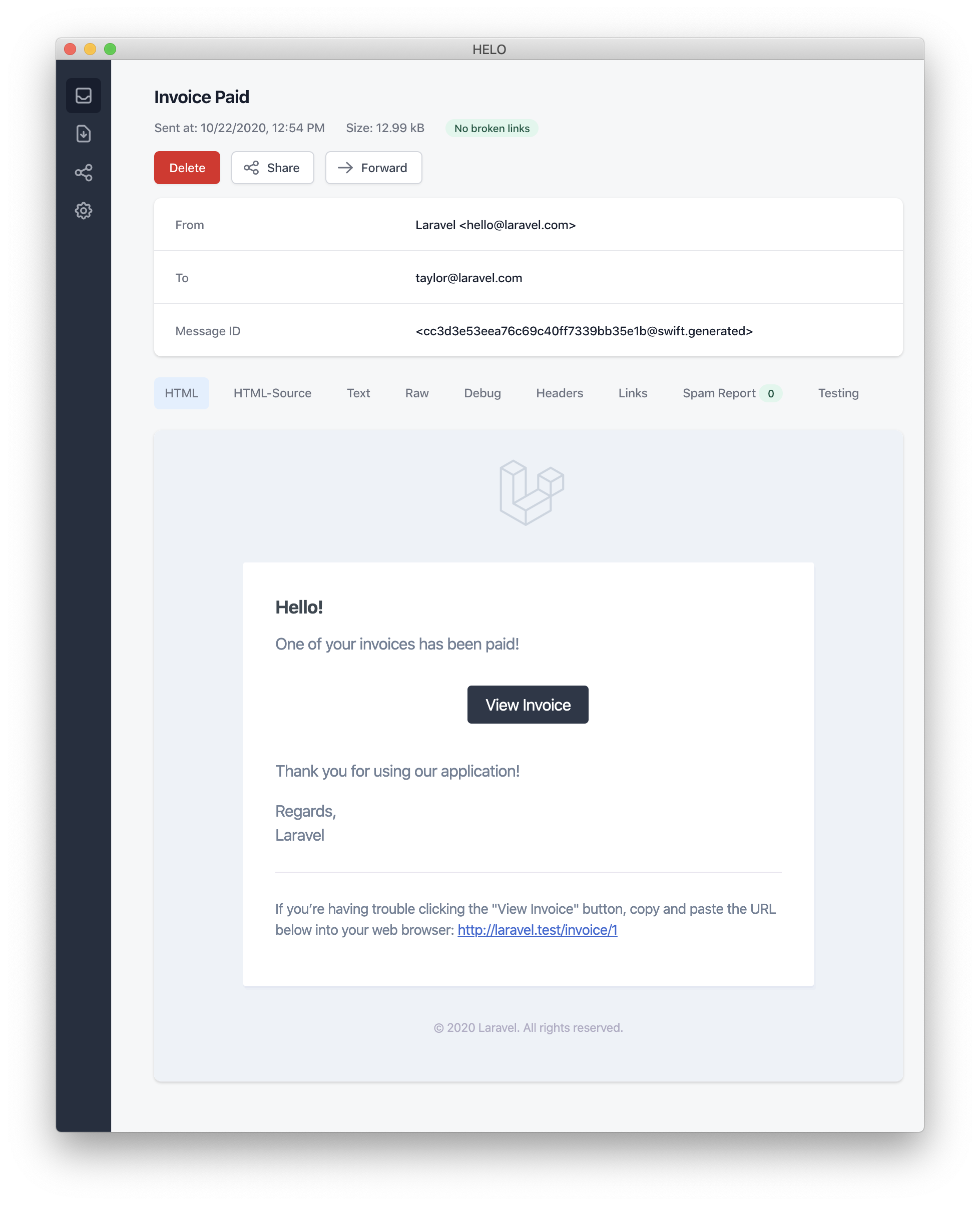
MailMessage 類別包含一些簡單的方法來幫助您建立交易式電子郵件訊息。郵件訊息可以包含文字行以及「呼叫動作 (call to action)」。讓我們看一個 toMail 方法的範例:
/**
 * Get the mail representation of the notification.
 */
public function toMail(object $notifiable): MailMessage
{
    $url = url('/invoice/'.$this->invoice->id);

    return (new MailMessage)
        ->greeting('Hello!')
        ->line('One of your invoices has been paid!')
        ->lineIf($this->amount > 0, "Amount paid: {$this->amount}")
        ->action('View Invoice', $url)
        ->line('Thank you for using our application!');
}📌 備註
請注意,我們在 toMail 方法中使用了 $this->invoice->id。您可以將通知產生訊息所需的任何資料傳遞到通知的建構子中。
在此範例中,我們註冊了問候語、一行文字、呼叫動作,然後是另一行文字。MailMessage 物件提供的這些方法使得格式化小型交易式電子郵件變得簡單且快速。郵件頻道隨後會將訊息組件轉換為美觀、響應式的 HTML 電子郵件範本,並附帶純文字版本。以下是由 mail 頻道產生的電子郵件範例:
📌 備註
發送郵件通知時,請確保在 config/app.php 設定檔中設定 name 設定選項。此值將用於郵件通知訊息的頁首和頁尾。
錯誤訊息
某些通知會告知使用者錯誤,例如發票付款失敗。在建立訊息時,您可以透過呼叫 error 方法來指出該郵件訊息是關於錯誤的。在郵件訊息上使用 error 方法時,呼叫動作按鈕將變為紅色而非黑色:
/**
 * Get the mail representation of the notification.
 */
public function toMail(object $notifiable): MailMessage
{
    return (new MailMessage)
        ->error()
        ->subject('Invoice Payment Failed')
        ->line('...');
}其他郵件通知格式化選項
除了在通知類別中定義文字「行 (lines)」之外,您還可以使用 view 方法指定一個自訂範本,用於渲染通知電子郵件:
/**
 * Get the mail representation of the notification.
 */
public function toMail(object $notifiable): MailMessage
{
    return (new MailMessage)->view(
        'mail.invoice.paid', ['invoice' => $this->invoice]
    );
}您可以透過將視圖名稱作為傳遞給 view 方法的陣列的第二個元素,來為郵件訊息指定純文字視圖:
/**
 * Get the mail representation of the notification.
 */
public function toMail(object $notifiable): MailMessage
{
    return (new MailMessage)->view(
        ['mail.invoice.paid', 'mail.invoice.paid-text'],
        ['invoice' => $this->invoice]
    );
}或者,如果您的訊息只有純文字視圖,您可以使用 text 方法:
/**
 * Get the mail representation of the notification.
 */
public function toMail(object $notifiable): MailMessage
{
    return (new MailMessage)->text(
        'mail.invoice.paid-text', ['invoice' => $this->invoice]
    );
}自訂寄件者
預設情況下,電子郵件的寄件者 / 發送位址定義在 config/mail.php 設定檔中。但是,您可以使用 from 方法為特定的通知指定發送位址:
/**
 * Get the mail representation of the notification.
 */
public function toMail(object $notifiable): MailMessage
{
    return (new MailMessage)
        ->from('[email protected]', 'Barrett Blair')
        ->line('...');
}自訂收件者
當透過 mail 頻道發送通知時,通知系統會自動在您的可通知實體上尋找 email 屬性。您可以透過在可通知實體上定義 routeNotificationForMail 方法來自訂用於傳遞通知的電子郵件位址:
<?php

namespace App\Models;

use Illuminate\Foundation\Auth\User as Authenticatable;
use Illuminate\Notifications\Notifiable;
use Illuminate\Notifications\Notification;

class User extends Authenticatable
{
    use Notifiable;

    /**
     * Route notifications for the mail channel.
     *
     * @return  array<string, string>|string
     */
    public function routeNotificationForMail(Notification $notification): array|string
    {
        // Return email address only...
        return $this->email_address;

        // Return email address and name...
        return [$this->email_address => $this->name];
    }
}自訂主旨
預設情況下,電子郵件的主旨是格式化為「標題大小寫 (Title Case)」的通知類別名稱。因此,如果您的通知類別名為 InvoicePaid,電子郵件的主旨將是 Invoice Paid。如果您想為訊息指定不同的主旨,可以在建立訊息時呼叫 subject 方法:
/**
 * Get the mail representation of the notification.
 */
public function toMail(object $notifiable): MailMessage
{
    return (new MailMessage)
        ->subject('Notification Subject')
        ->line('...');
}自訂 Mailer
預設情況下,電子郵件通知將使用 config/mail.php 設定檔中定義的預設 Mailer 發送。但是,您可以在執行時透過呼叫 mailer 方法來指定不同的 Mailer:
/**
 * Get the mail representation of the notification.
 */
public function toMail(object $notifiable): MailMessage
{
    return (new MailMessage)
        ->mailer('postmark')
        ->line('...');
}自訂範本
您可以透過發佈通知套件的資源來修改郵件通知所使用的 HTML 和純文字範本。執行此命令後,郵件通知範本將位於 resources/views/vendor/notifications 目錄中:
php artisan vendor:publish --tag=laravel-notifications附件
若要向郵件通知新增附件,請在構建訊息時使用 attach 方法。attach 方法的第一個參數接受檔案的絕對路徑:
/**
 * Get the mail representation of the notification.
 */
public function toMail(object $notifiable): MailMessage
{
    return (new MailMessage)
        ->greeting('Hello!')
        ->attach('/path/to/file');
}📌 備註
通知郵件訊息提供的 attach 方法也接受 可附加物件 (Attachable Objects)。請參閱詳盡的 可附加物件文件 以了解更多資訊。
將檔案附加到訊息時,您也可以透過向 attach 方法傳遞 array 作為第二個參數,來指定顯示名稱或 MIME 類型:
/**
 * Get the mail representation of the notification.
 */
public function toMail(object $notifiable): MailMessage
{
    return (new MailMessage)
        ->greeting('Hello!')
        ->attach('/path/to/file', [
            'as' => 'name.pdf',
            'mime' => 'application/pdf',
        ]);
}與在 mailable 物件中附加檔案不同,您無法使用 attachFromStorage 直接從儲存磁碟附加檔案。您應該使用 attach 方法並提供儲存磁碟上檔案的絕對路徑。或者,您可以從 toMail 方法回傳一個 mailable:
use App\Mail\InvoicePaid as InvoicePaidMailable;

/**
 * Get the mail representation of the notification.
 */
public function toMail(object $notifiable): Mailable
{
    return (new InvoicePaidMailable($this->invoice))
        ->to($notifiable->email)
        ->attachFromStorage('/path/to/file');
}必要時,可以使用 attachMany 方法將多個檔案附加到訊息中:
/**
 * Get the mail representation of the notification.
 */
public function toMail(object $notifiable): MailMessage
{
    return (new MailMessage)
        ->greeting('Hello!')
        ->attachMany([
            '/path/to/forge.svg',
            '/path/to/vapor.svg' => [
                'as' => 'Logo.svg',
                'mime' => 'image/svg+xml',
            ],
        ]);
}原始資料附件
attachData 方法可用於將原始位元組字串作為附件附加。呼叫 attachData 方法時,您應該提供要分配給該附件的檔名:
/**
 * Get the mail representation of the notification.
 */
public function toMail(object $notifiable): MailMessage
{
    return (new MailMessage)
        ->greeting('Hello!')
        ->attachData($this->pdf, 'name.pdf', [
            'mime' => 'application/pdf',
        ]);
}新增標籤與中繼資料 (Metadata)
某些第三方郵件供應商(如 Mailgun 和 Postmark)支援訊息「標籤 (Tags)」和「中繼資料 (Metadata)」,這些可用於對應用程式發送的郵件進行分組和追蹤。您可以使用 tag 和 metadata 方法為郵件訊息新增標籤和中繼資料:
/**
 * Get the mail representation of the notification.
 */
public function toMail(object $notifiable): MailMessage
{
    return (new MailMessage)
        ->greeting('Comment Upvoted!')
        ->tag('upvote')
        ->metadata('comment_id', $this->comment->id);
}如果您的應用程式使用 Mailgun 驅動程式,您可以參考 Mailgun 的文件以獲取有關 標籤 和 中繼資料 的更多資訊。同樣地,也可以參考 Postmark 文件以了解其對 標籤 和 中繼資料 支援的更多資訊。
如果您的應用程式使用 Amazon SES 發送電子郵件,您應該使用 metadata 方法將 SES「標籤」 附加到訊息中。
自訂 Symfony 訊息
MailMessage 類別的 withSymfonyMessage 方法允許您註冊一個閉包 (Closure),該閉包將在發送訊息前以 Symfony 訊息執行個體作為參數被呼叫。這讓您有機會在訊息傳送前對其進行深度自訂:
use Symfony\Component\Mime\Email;

/**
 * Get the mail representation of the notification.
 */
public function toMail(object $notifiable): MailMessage
{
    return (new MailMessage)
        ->withSymfonyMessage(function (Email $message) {
            $message->getHeaders()->addTextHeader(
                'Custom-Header', 'Header Value'
            );
        });
}使用 Mailables
如有需要,您可以從通知的 toMail 方法回傳一個完整的 mailable 物件。當回傳 Mailable 而非 MailMessage 時,您需要使用 mailable 物件的 to 方法來指定訊息收件者:
use App\Mail\InvoicePaid as InvoicePaidMailable;
use Illuminate\Mail\Mailable;

/**
 * Get the mail representation of the notification.
 */
public function toMail(object $notifiable): Mailable
{
    return (new InvoicePaidMailable($this->invoice))
        ->to($notifiable->email);
}Mailables 與隨選通知
如果您正在發送 隨選通知,傳遞給 toMail 方法的 $notifiable 執行個體將會是 Illuminate\Notifications\AnonymousNotifiable 的執行個體,它提供了一個 routeNotificationFor 方法,可用於獲取隨選通知應發送到的電子郵件地址:
use App\Mail\InvoicePaid as InvoicePaidMailable;
use Illuminate\Notifications\AnonymousNotifiable;
use Illuminate\Mail\Mailable;

/**
 * Get the mail representation of the notification.
 */
public function toMail(object $notifiable): Mailable
{
    $address = $notifiable instanceof AnonymousNotifiable
        ? $notifiable->routeNotificationFor('mail')
        : $notifiable->email;

    return (new InvoicePaidMailable($this->invoice))
        ->to($address);
}預覽郵件通知
在設計郵件通知範本時,能夠像預覽一般的 Blade 範本一樣在瀏覽器中快速預覽渲染後的郵件訊息是非常方便的。因此,Laravel 允許您直接從路由閉包或控制器回傳由郵件通知產生的任何郵件訊息。當回傳 MailMessage 時,它將被渲染並顯示在瀏覽器中,讓您能快速預覽其設計,而無需發送到實際的電子郵件地址:
use App\Models\Invoice;
use App\Notifications\InvoicePaid;

Route::get('/notification', function () {
    $invoice = Invoice::find(1);

    return (new InvoicePaid($invoice))
        ->toMail($invoice->user);
});Markdown 郵件通知
Markdown 郵件通知讓您可以利用郵件通知預置的範本,同時讓您有更多自由來編寫更長、更自訂化的訊息。由於訊息是用 Markdown 編寫的,Laravel 能夠為訊息渲染出美觀且響應式的 HTML 範本,同時也會自動產生純文字副本。
產生訊息
若要產生包含對應 Markdown 範本的通知,您可以在 make:notification Artisan 指令中使用 --markdown 選項:
php artisan make:notification InvoicePaid --markdown=mail.invoice.paid就像所有其他的郵件通知一樣,使用 Markdown 範本的通知應該在通知類別中定義 toMail 方法。不過,與其使用 line 和 action 方法來建構通知,請改用 markdown 方法來指定應使用的 Markdown 範本名稱。您希望在範本中使用的資料陣列可以作為該方法的第二個參數傳遞:
/**
 * Get the mail representation of the notification.
 */
public function toMail(object $notifiable): MailMessage
{
    $url = url('/invoice/'.$this->invoice->id);

    return (new MailMessage)
        ->subject('Invoice Paid')
        ->markdown('mail.invoice.paid', ['url' => $url]);
}編寫訊息
Markdown 郵件通知結合了 Blade 組件和 Markdown 語法,讓您能輕鬆建構通知,同時利用 Laravel 預先設計好的通知組件:
<x-mail::message>
# Invoice Paid

Your invoice has been paid!

<x-mail::button :url="$url">
View Invoice
</x-mail::button>

Thanks,<br>
{{ config('app.name') }}
</x-mail::message>📌 備註
編寫 Markdown 郵件時請勿使用過多的縮排。根據 Markdown 標準,Markdown 解析器會將縮排的內容渲染為程式碼區塊。
按鈕組件 (Button Component)
按鈕組件會渲染一個居中的按鈕連結。該組件接受兩個參數:url 和選填的 color。支援的顏色有 primary、green 和 red。您可以根據需求在通知中加入任意數量的按鈕組件:
<x-mail::button :url="$url" color="green">
View Invoice
</x-mail::button>面板組件 (Panel Component)
面板組件將指定的文字區塊渲染在一個背景顏色與通知其他部分略有不同的面板中。這讓您可以吸引使用者注意特定的文字區塊:
<x-mail::panel>
This is the panel content.
</x-mail::panel>表格組件 (Table Component)
表格組件讓您可以將 Markdown 表格轉換為 HTML 表格。該組件接受 Markdown 表格作為其內容。支援使用預設的 Markdown 表格對齊語法來對齊表格欄位:
<x-mail::table>
| Laravel       | Table         | Example       |
| ------------- | :-----------: | ------------: |
| Col 2 is      | Centered      | $10           |
| Col 3 is      | Right-Aligned | $20           |
</x-mail::table>自訂組件
您可以將所有的 Markdown 通知組件匯出到您自己的應用程式中進行自訂。若要匯出組件,請使用 vendor:publish Artisan 指令來發佈 laravel-mail 資源標籤:
php artisan vendor:publish --tag=laravel-mail此指令會將 Markdown 郵件組件發佈到 resources/views/vendor/mail 目錄。mail 目錄將包含 html 和 text 目錄,分別包含每個可用組件的對應呈現方式。您可以隨意自訂這些組件。
自訂 CSS
匯出組件後,resources/views/vendor/mail/html/themes 目錄將包含一個 default.css 檔案。您可以在此檔案中自訂 CSS,您的樣式將會自動嵌入 (In-lined) 到 Markdown 通知的 HTML 呈現中。
如果您想為 Laravel 的 Markdown 組件建構一個全新的主題,可以在 html/themes 目錄中放置一個 CSS 檔案。命名並儲存 CSS 檔案後,請更新 mail 設定檔中的 theme 選項,使其與新主題的名稱相符。
若要為單個通知自訂主題,您可以在建構通知的郵件訊息時呼叫 theme 方法。theme 方法接受發送通知時應使用的主題名稱:
/**
 * Get the mail representation of the notification.
 */
public function toMail(object $notifiable): MailMessage
{
    return (new MailMessage)
        ->theme('invoice')
        ->subject('Invoice Paid')
        ->markdown('mail.invoice.paid', ['url' => $url]);
}資料庫通知
前置準備
database 通知頻道將通知資訊儲存在資料庫資料表中。此資料表包含通知類型以及描述通知的 JSON 資料結構等資訊。
您可以查詢該資料表,以在應用程式的使用者介面中顯示通知。但在執行此操作之前,您需要建立一個資料庫資料表來存放您的通知。您可以使用 make:notifications-table 命令來產生具有正確資料表結構的遷移 (Migration):
php artisan make:notifications-table

php artisan migrate📌 備註
如果您被通知的模型使用的是 UUID 或 ULID 主鍵,您應該在通知資料表遷移中將 morphs 方法替換為 uuidMorphs 或 ulidMorphs。
格式化資料庫通知
如果通知支援儲存在資料庫資料表中,您應該在通知類別中定義 toDatabase 或 toArray 方法。此方法將接收一個 $notifiable 實體,並應回傳一個純 PHP 陣列。回傳的陣列將被編碼為 JSON 並儲存在 notifications 資料表的 data 欄位中。讓我們看一個 toArray 方法的範例:
/**
 * Get the array representation of the notification.
 *
 * @return array<string, mixed>
 */
public function toArray(object $notifiable): array
{
    return [
        'invoice_id' => $this->invoice->id,
        'amount' => $this->invoice->amount,
    ];
}當通知儲存在應用程式的資料庫中時,type 欄位預設會設定為通知的類別名稱,而 read_at 欄位則為 null。但是,您可以透過在通知類別中定義 databaseType 和 initialDatabaseReadAtValue 方法來對此行為進行自訂:
use Illuminate\Support\Carbon;

/**
 * Get the notification's database type.
 */
public function databaseType(object $notifiable): string
{
    return 'invoice-paid';
}

/**
 * Get the initial value for the "read_at" column.
 */
public function initialDatabaseReadAtValue(): ?Carbon
{
    return null;
}toDatabase vs. toArray
toArray 方法也由 broadcast 頻道使用,用來決定要廣播到 JavaScript 前端開發環境的資料。如果您想為 database 和 broadcast 頻道提供兩個不同的陣列表示形式,您應該定義 toDatabase 方法而不是 toArray 方法。
存取通知
一旦通知儲存在資料庫中,您需要一種方便的方式從被通知的實體存取它們。Laravel 預設的 App\Models\User 模型中包含的 Illuminate\Notifications\Notifiable trait,提供了一個 notifications Eloquent 關聯,它會回傳該實體的通知。若要獲取通知,您可以像存取任何其他 Eloquent 關聯一樣存取此方法。預設情況下,通知將依 created_at 時間戳記進行排序,最新的通知位於集合的開頭:
$user = App\Models\User::find(1);

foreach ($user->notifications as $notification) {
    echo $notification->type;
}如果您只想檢索「未讀」通知,可以使用 unreadNotifications 關聯。同樣地,這些通知將依 created_at 時間戳記進行排序,最新的通知位於集合的開頭:
$user = App\Models\User::find(1);

foreach ($user->unreadNotifications as $notification) {
    echo $notification->type;
}如果您只想檢索「已讀」通知,可以使用 readNotifications 關聯:
$user = App\Models\User::find(1);

foreach ($user->readNotifications as $notification) {
    echo $notification->type;
}📌 備註
若要從 JavaScript 用戶端存取您的通知,您應該為應用程式定義一個通知控制器,該控制器回傳被通知實體(例如目前使用者)的通知。然後,您可以從 JavaScript 用戶端向該控制器的 URL 發送 HTTP 請求。
將通知標記為已讀
通常,您會希望在使用者查看通知時將其標記為「已讀」。Illuminate\Notifications\Notifiable trait 提供了一個 markAsRead 方法,該方法會更新通知資料庫記錄中的 read_at 欄位:
$user = App\Models\User::find(1);

foreach ($user->unreadNotifications as $notification) {
    $notification->markAsRead();
}但是,您也可以直接在通知集合上使用 markAsRead 方法,而不是迴圈走訪每個通知:
$user->unreadNotifications->markAsRead();您也可以使用批次更新查詢來將所有通知標記為已讀,而無需從資料庫中檢索它們:
$user = App\Models\User::find(1);

$user->unreadNotifications()->update(['read_at' => now()]);您可以 delete 通知以將其從資料表中徹底刪除:
$user->notifications()->delete();廣播通知
前置準備
在廣播通知之前,你應該先設定並熟悉 Laravel 的 事件廣播 (Event Broadcasting) 服務。事件廣播提供了一種從以 JavaScript 驅動的前端回應伺服器端 Laravel 事件的方法。
格式化廣播通知
broadcast 頻道使用 Laravel 的 事件廣播 服務來廣播通知,讓你的 JavaScript 前端能夠即時捕捉通知。如果通知支援廣播,你可以在通知類別中定義 toBroadcast 方法。此方法會接收一個 $notifiable 實體,並應回傳一個 BroadcastMessage 實例。如果 toBroadcast 方法不存在,則會使用 toArray 方法來收集應廣播的資料。回傳的資料將被編碼為 JSON 並廣播到你的 JavaScript 前端。讓我們來看一個 toBroadcast 方法的範例:
use Illuminate\Notifications\Messages\BroadcastMessage;

/**
 * Get the broadcastable representation of the notification.
 */
public function toBroadcast(object $notifiable): BroadcastMessage
{
    return new BroadcastMessage([
        'invoice_id' => $this->invoice->id,
        'amount' => $this->invoice->amount,
    ]);
}廣播隊列設定
所有廣播通知都會排入隊列以進行廣播。如果你想設定用於排隊廣播操作的隊列連線或隊列名稱,可以使用 BroadcastMessage 的 onConnection 與 onQueue 方法:
return (new BroadcastMessage($data))
    ->onConnection('sqs')
->onQueue('broadcasts');自訂通知類型
除了你指定的資料外,所有廣播通知還包含一個 type 欄位,其中包含通知的完整類別名稱。如果你想自訂通知的 type,可以在通知類別中定義 broadcastType 方法:
/**
 * Get the type of the notification being broadcast.
 */
public function broadcastType(): string
{
    return 'broadcast.message';
}監聽通知
通知將在一個使用 {notifiable}.{id} 慣例格式化的私有頻道上進行廣播。因此,如果你向 ID 為 1 的 App\Models\User 實例發送通知,該通知將在 App.Models.User.1 私有頻道上廣播。使用 Laravel Echo 時,你可以使用 notification 方法輕鬆地監聽頻道上的通知:
Echo.private('App.Models.User.' + userId)
    .notification((notification) => {
        console.log(notification.type);
});使用 React 或 Vue
Laravel Echo 包含了 React 與 Vue 的 Hooks,讓監聽通知變得非常簡單。要開始使用,請呼叫 useEchoNotification Hook,它用於監聽通知。當使用的組件被卸載 (Unmounted) 時,useEchoNotification Hook 會自動離開頻道:
import { useEchoNotification } from "@laravel/echo-react";

useEchoNotification(
    `App.Models.User.${userId}`,
    (notification) => {
        console.log(notification.type);
    },
);<script setup lang="ts">
import { useEchoNotification } from "@laravel/echo-vue";
useEchoNotification(
`App.Models.User.${userId}`,
(notification) => {
console.log(notification.type);
},
);
</script>預設情況下,此 Hook 會監聽所有通知。若要指定你想監聽的通知類型,你可以為 useEchoNotification 提供字串或類型陣列:
import { useEchoNotification } from "@laravel/echo-react";

useEchoNotification(
    `App.Models.User.${userId}`,
    (notification) => {
        console.log(notification.type);
    },
    'App.Notifications.InvoicePaid',
);<script setup lang="ts">
import { useEchoNotification } from "@laravel/echo-vue";
useEchoNotification(
`App.Models.User.${userId}`,
(notification) => {
console.log(notification.type);
},
'App.Notifications.InvoicePaid',
);
</script>你也可以指定通知酬載資料的形狀 (Shape),提供更好的型別安全性與編輯便利性:
type InvoicePaidNotification = {
    invoice_id: number;
    created_at: string;
};

useEchoNotification<InvoicePaidNotification>(
    `App.Models.User.${userId}`,
    (notification) => {
        console.log(notification.invoice_id);
        console.log(notification.created_at);
        console.log(notification.type);
    },
    'App.Notifications.InvoicePaid',
);自訂通知頻道
如果你想自訂實體的廣播通知在哪個頻道上廣播,可以在該可接收通知 (Notifiable) 的實體上定義 receivesBroadcastNotificationsOn 方法:
<?php

namespace App\Models;

use Illuminate\Broadcasting\PrivateChannel;
use Illuminate\Foundation\Auth\User as Authenticatable;
use Illuminate\Notifications\Notifiable;

class User extends Authenticatable
{
    use Notifiable;

    /**
     * The channels the user receives notification broadcasts on.
     */
    public function receivesBroadcastNotificationsOn(): string
    {
        return 'users.'.$this->id;
    }
}簡訊 (SMS) 通知
前置準備
Laravel 中的簡訊通知發送功能由 Vonage (前身為 Nexmo) 提供支援。在您能透過 Vonage 發送通知之前,您需要安裝 laravel/vonage-notification-channel 與 guzzlehttp/guzzle 套件:
composer require laravel/vonage-notification-channel guzzlehttp/guzzle該套件包含一個 設定檔。然而,您不需要將此設定檔匯出到您自己的應用程式中。您可以直接使用 VONAGE_KEY 與 VONAGE_SECRET 環境變數來定義您的 Vonage 公鑰與私鑰。
定義好您的金鑰後,您應該設定一個 VONAGE_SMS_FROM 環境變數,用以定義預設發送簡訊訊息的電話號碼。您可以在 Vonage 管理控制台中產生這個電話號碼:
VONAGE_SMS_FROM=15556666666格式化簡訊通知
如果一個通知支援以簡訊發送,您應該在通知類別中定義一個 toVonage 方法。該方法將接收一個 $notifiable 實體,並應回傳一個 Illuminate\Notifications\Messages\VonageMessage 實例:
use Illuminate\Notifications\Messages\VonageMessage;

/**
 * Get the Vonage / SMS representation of the notification.
 */
public function toVonage(object $notifiable): VonageMessage
{
    return (new VonageMessage)
        ->content('Your SMS message content');
}Unicode 內容
如果您的簡訊訊息將包含 Unicode 字元,您應該在建構 VonageMessage 實例時呼叫 unicode 方法:
use Illuminate\Notifications\Messages\VonageMessage;

/**
 * Get the Vonage / SMS representation of the notification.
 */
public function toVonage(object $notifiable): VonageMessage
{
    return (new VonageMessage)
        ->content('Your unicode message')
        ->unicode();
}自訂「寄件者」號碼
如果您想從不同於 VONAGE_SMS_FROM 環境變數所指定的電話號碼發送某些通知,您可以在 VonageMessage 實例上呼叫 from 方法:
use Illuminate\Notifications\Messages\VonageMessage;

/**
 * Get the Vonage / SMS representation of the notification.
 */
public function toVonage(object $notifiable): VonageMessage
{
    return (new VonageMessage)
        ->content('Your SMS message content')
        ->from('15554443333');
}新增用戶端參考 (Client Reference)
如果您想追蹤每個使用者、團隊或用戶端的費用,您可以在通知中加入一個「用戶端參考 (Client Reference)」。Vonage 允許您使用此用戶端參考產生報告,以便您更清楚地了解特定客戶的簡訊使用情況。用戶端參考可以是任何長度不超過 40 個字元的字串:
use Illuminate\Notifications\Messages\VonageMessage;

/**
 * Get the Vonage / SMS representation of the notification.
 */
public function toVonage(object $notifiable): VonageMessage
{
    return (new VonageMessage)
        ->clientReference((string) $notifiable->id)
        ->content('Your SMS message content');
}路由簡訊通知
要將 Vonage 通知路由到正確的電話號碼,請在您的可通知實體上定義一個 routeNotificationForVonage 方法:
<?php

namespace App\Models;

use Illuminate\Foundation\Auth\User as Authenticatable;
use Illuminate\Notifications\Notifiable;
use Illuminate\Notifications\Notification;

class User extends Authenticatable
{
    use Notifiable;

    /**
     * Route notifications for the Vonage channel.
     */
    public function routeNotificationForVonage(Notification $notification): string
    {
        return $this->phone_number;
    }
}Slack 通知
前置準備
在發送 Slack 通知之前,你應該透過 Composer 安裝 Slack 通知頻道:
composer require laravel/slack-notification-channel此外,你必須為你的 Slack 工作區建立一個 Slack App。
如果你只需要將通知發送到建立該 App 的同一個 Slack 工作區,你應該確保你的 App 具有 chat:write、chat:write.public 以及 chat:write.customize 範圍 (Scopes)。這些範圍可以在 Slack 內的「OAuth & Permissions」App 管理分頁中新增。
接著,複製 App 的「Bot User OAuth Token」,並將其放置在應用程式 services.php 設定檔中的 slack 設定陣列內。此權杖 (Token) 可以在 Slack 內的「OAuth & Permissions」分頁中找到:
'slack' => [
    'notifications' => [
        'bot_user_oauth_token' => env('SLACK_BOT_USER_OAUTH_TOKEN'),
        'channel' => env('SLACK_BOT_USER_DEFAULT_CHANNEL'),
    ],
],App 分發
如果你的應用程式將向應用程式使用者擁有的外部 Slack 工作區發送通知,你將需要透過 Slack「分發 (Distribute)」你的 App。App 分發可以在 Slack 內的 App「Manage Distribution」分頁進行管理。一旦你的 App 完成分發,你就可以使用 Socialite 代表應用程式的使用者來取得 Slack Bot 權杖。
格式化 Slack 通知
如果通知支援以 Slack 訊息發送,你應該在通知類別中定義一個 toSlack 方法。此方法將接收一個 $notifiable 實體,並應回傳一個 Illuminate\Notifications\Slack\SlackMessage 實體。你可以使用 Slack 的 Block Kit API 來構建豐富的通知。以下範例可以在 Slack 的 Block Kit builder 中進行預覽:
use Illuminate\Notifications\Slack\BlockKit\Blocks\ContextBlock;
use Illuminate\Notifications\Slack\BlockKit\Blocks\SectionBlock;
use Illuminate\Notifications\Slack\SlackMessage;

/**
 * Get the Slack representation of the notification.
 */
public function toSlack(object $notifiable): SlackMessage
{
    return (new SlackMessage)
        ->text('One of your invoices has been paid!')
        ->headerBlock('Invoice Paid')
        ->contextBlock(function (ContextBlock $block) {
            $block->text('Customer #1234');
        })
        ->sectionBlock(function (SectionBlock $block) {
            $block->text('An invoice has been paid.');
            $block->field("*Invoice No:*\n1000")->markdown();
            $block->field("*Invoice Recipient:*\n[email protected]")->markdown();
        })
        ->dividerBlock()
        ->sectionBlock(function (SectionBlock $block) {
            $block->text('Congratulations!');
        });
}使用 Slack 的 Block Kit Builder 範本
除了使用流暢的訊息構建器方法來建立你的 Block Kit 訊息之外,你也可以將 Slack Block Kit Builder 產生的原始 JSON 酬載 (Payload) 提供給 usingBlockKitTemplate 方法:
use Illuminate\Notifications\Slack\SlackMessage;
use Illuminate\Support\Str;

/**
 * Get the Slack representation of the notification.
 */
public function toSlack(object $notifiable): SlackMessage
{
    $template = <<<JSON
        {
          "blocks": [
            {
              "type": "header",
              "text": {
                "type": "plain_text",
                "text": "Team Announcement"
              }
            },
            {
              "type": "section",
              "text": {
                "type": "plain_text",
                "text": "We are hiring!"
              }
            }
          ]
        }
    JSON;

    return (new SlackMessage)
        ->usingBlockKitTemplate($template);
}Slack 互動性
Slack 的 Block Kit 通知系統提供強大的功能來處理使用者互動。要利用這些功能,您的 Slack App 應啟用「Interactivity」並設定一個指向您應用程式所提供 URL 的「Request URL」。這些設定可以從 Slack 內的「Interactivity & Shortcuts」應用程式管理分頁中進行管理。
在以下範例中,使用了 actionsBlock 方法,Slack 將向您的「Request URL」發送一個 POST 請求,其內容負載包含點擊按鈕的 Slack 使用者、點擊按鈕的 ID 等資訊。接著您的應用程式可以根據該內容負載決定要採取的動作。您也應該驗證請求是否是由 Slack 發出的:
use Illuminate\Notifications\Slack\BlockKit\Blocks\ActionsBlock;
use Illuminate\Notifications\Slack\BlockKit\Blocks\ContextBlock;
use Illuminate\Notifications\Slack\BlockKit\Blocks\SectionBlock;
use Illuminate\Notifications\Slack\SlackMessage;

/**
 * Get the Slack representation of the notification.
 */
public function toSlack(object $notifiable): SlackMessage
{
    return (new SlackMessage)
        ->text('One of your invoices has been paid!')
        ->headerBlock('Invoice Paid')
        ->contextBlock(function (ContextBlock $block) {
            $block->text('Customer #1234');
        })
        ->sectionBlock(function (SectionBlock $block) {
            $block->text('An invoice has been paid.');
        })
        ->actionsBlock(function (ActionsBlock $block) {
             // ID defaults to "button_acknowledge_invoice"...
            $block->button('Acknowledge Invoice')->primary();

            // Manually configure the ID...
            $block->button('Deny')->danger()->id('deny_invoice');
        });
}確認對話視窗
如果您希望使用者在執行動作之前必須先確認,則可以在定義按鈕時呼叫 confirm 方法。confirm 方法接受一個訊息和一個接收 ConfirmObject 實例的閉包:
use Illuminate\Notifications\Slack\BlockKit\Blocks\ActionsBlock;
use Illuminate\Notifications\Slack\BlockKit\Blocks\ContextBlock;
use Illuminate\Notifications\Slack\BlockKit\Blocks\SectionBlock;
use Illuminate\Notifications\Slack\BlockKit\Composites\ConfirmObject;
use Illuminate\Notifications\Slack\SlackMessage;

/**
 * Get the Slack representation of the notification.
 */
public function toSlack(object $notifiable): SlackMessage
{
    return (new SlackMessage)
        ->text('One of your invoices has been paid!')
        ->headerBlock('Invoice Paid')
        ->contextBlock(function (ContextBlock $block) {
            $block->text('Customer #1234');
        })
        ->sectionBlock(function (SectionBlock $block) {
            $block->text('An invoice has been paid.');
        })
        ->actionsBlock(function (ActionsBlock $block) {
            $block->button('Acknowledge Invoice')
                ->primary()
                ->confirm(
                    'Acknowledge the payment and send a thank you email?',
                    function (ConfirmObject $dialog) {
                        $dialog->confirm('Yes');
                        $dialog->deny('No');
                    }
                );
        });
}檢查 Slack 區塊 (Blocks)
如果您想快速檢查您所構建的區塊,可以在 SlackMessage 實例上呼叫 dd 方法。dd 方法將產生並傾印 (dump) 一個指向 Slack 的 Block Kit Builder 的 URL,該網站會在您的瀏覽器中顯示內容負載和通知的預覽。您可以向 dd 方法傳遞 true 來傾印原始內容負載:
return (new SlackMessage)
    ->text('One of your invoices has been paid!')
    ->headerBlock('Invoice Paid')
->dd();路由 Slack 通知
要將 Slack 通知導向適當的 Slack 團隊和頻道,請在您的可通知模型上定義一個 routeNotificationForSlack 方法。此方法可以回傳以下三種值之一:
null- 這會將路由延遲到通知本身設定的頻道。您可以在建立SlackMessage時使用to方法在通知內設定頻道。- 指定要發送通知的 Slack 頻道的字串,例如
#support-channel。 - 一個
SlackRoute實例,它允許您指定 OAuth 權杖 (token) 和頻道名稱,例如SlackRoute::make($this->slack_channel, $this->slack_token)。此方法應當用於向外部工作區發送通知。
例如,從 routeNotificationForSlack 方法回傳 #support-channel 將會把通知發送到與您應用程式 services.php 設定檔中的 Bot 使用者 OAuth 權杖相關聯的工作區中的 #support-channel 頻道:
<?php

namespace App\Models;

use Illuminate\Foundation\Auth\User as Authenticatable;
use Illuminate\Notifications\Notifiable;
use Illuminate\Notifications\Notification;

class User extends Authenticatable
{
    use Notifiable;

    /**
     * Route notifications for the Slack channel.
     */
    public function routeNotificationForSlack(Notification $notification): mixed
    {
        return '#support-channel';
    }
}通知外部 Slack 工作區
📌 備註
在向外部 Slack 工作區發送通知之前,您的 Slack App 必須先發佈。
當然,您通常會希望向應用程式使用者所擁有的 Slack 工作區發送通知。為此,您首先需要取得該使用者的 Slack OAuth 權杖。幸運的是,Laravel Socialite 包含一個 Slack 驅動程式,可以讓您輕鬆地透過 Slack 驗證應用程式的使用者並取得 Bot 權杖。
取得 Bot 權杖並將其儲存在應用程式的資料庫中後,您可以使用 SlackRoute::make 方法將通知路由到使用者的工作區。此外,您的應用程式可能需要提供機會讓使用者指定應將通知發送到哪個頻道:
<?php

namespace App\Models;

use Illuminate\Foundation\Auth\User as Authenticatable;
use Illuminate\Notifications\Notifiable;
use Illuminate\Notifications\Notification;
use Illuminate\Notifications\Slack\SlackRoute;

class User extends Authenticatable
{
    use Notifiable;

    /**
     * Route notifications for the Slack channel.
     */
    public function routeNotificationForSlack(Notification $notification): mixed
    {
        return SlackRoute::make($this->slack_channel, $this->slack_token);
    }
}在地化通知
Laravel 允許你使用 HTTP 請求當前語系以外的語系發送通知,甚至在通知進入隊列後仍會記住該語系。
為了實現這一點,Illuminate\Notifications\Notification 類別提供了 locale 方法來設定所需的語言。當通知正在進行評估時,應用程式會切換到此語系,並在評估完成後還原回先前的語系:
$user->notify((new InvoicePaid($invoice))->locale('es'));多個可通知實體的在地化也可以透過 Notification facade 來達成:
Notification::locale('es')->send(
    $users, new InvoicePaid($invoice)
);使用者偏好語系
有時,應用程式會儲存每個使用者的偏好語系。透過在你的可通知模型上實作 HasLocalePreference 合約,你可以指示 Laravel 在發送通知時使用此儲存的語系:
use Illuminate\Contracts\Translation\HasLocalePreference;

class User extends Model implements HasLocalePreference
{
    /**
     * Get the user's preferred locale.
     */
    public function preferredLocale(): string
    {
        return $this->locale;
    }
}一旦實作了該介面,Laravel 在向該模型發送通知和 mailable 時將自動使用偏好語系。因此,使用此介面時無需調用 locale 方法:
$user->notify(new InvoicePaid($invoice));測試
你可以使用 Notification facade 的 fake 方法來防止通知被發送。通常情況下,發送通知與你實際測試的程式碼無關。極大機率下,僅需簡單地斷言 Laravel 已被指示發送給定的通知即可。
在呼叫 Notification facade 的 fake 方法後,你接著可以斷言通知已被指示發送給使用者,甚至檢查通知接收到的資料:
<?php

use App\Notifications\OrderShipped;
use Illuminate\Support\Facades\Notification;

test('orders can be shipped', function () {
    Notification::fake();

    // Perform order shipping...

    // Assert that no notifications were sent...
    Notification::assertNothingSent();

    // Assert a notification was sent to the given users...
    Notification::assertSentTo(
        [$user], OrderShipped::class
    );

    // Assert a notification was not sent...
    Notification::assertNotSentTo(
        [$user], AnotherNotification::class
    );

    // Assert a notification was sent twice...
    Notification::assertSentTimes(WeeklyReminder::class, 2);

    // Assert that a given number of notifications were sent...
    Notification::assertCount(3);
});<?php
namespace Tests\Feature;
use App\Notifications\OrderShipped;
use Illuminate\Support\Facades\Notification;
use Tests\TestCase;
class ExampleTest extends TestCase
{
public function test_orders_can_be_shipped(): void
{
Notification::fake();
// Perform order shipping...
// Assert that no notifications were sent...
Notification::assertNothingSent();
// Assert a notification was sent to the given users...
Notification::assertSentTo(
[$user], OrderShipped::class
);
// Assert a notification was not sent...
Notification::assertNotSentTo(
[$user], AnotherNotification::class
);
// Assert a notification was sent twice...
Notification::assertSentTimes(WeeklyReminder::class, 2);
// Assert that a given number of notifications were sent...
Notification::assertCount(3);
}
}你可以向 assertSentTo 或 assertNotSentTo 方法傳遞一個閉包,以斷言發送出的通知通過了給定的「真值測試 (truth test)」。若至少有一個通知通過了給定的真值測試,則斷言將成功:
Notification::assertSentTo(
    $user,
    function (OrderShipped $notification, array $channels) use ($order) {
        return $notification->order->id === $order->id;
    }
);隨選通知
若你測試的程式碼發送了隨選通知,你可以透過 assertSentOnDemand 方法測試該隨選通知是否已發送:
Notification::assertSentOnDemand(OrderShipped::class);透過將閉包作為第二個參數傳遞給 assertSentOnDemand 方法,你可以判斷隨選通知是否被發送到正確的「路由」地址:
Notification::assertSentOnDemand(
    OrderShipped::class,
    function (OrderShipped $notification, array $channels, object $notifiable) use ($user) {
        return $notifiable->routes['mail'] === $user->email;
    }
);通知事件
通知發送中事件
當通知正在發送時,通知系統會派遣 Illuminate\Notifications\Events\NotificationSending 事件。此事件包含「可通知 (notifiable)」實體與通知實例本身。你可以在應用程式中為此事件建立事件監聽器:
use Illuminate\Notifications\Events\NotificationSending;

class CheckNotificationStatus
{
    /**
     * Handle the event.
     */
    public function handle(NotificationSending $event): void
    {
        // ...
    }
}如果 NotificationSending 事件的事件監聽器在其 handle 方法中回傳 false,則該通知將不會被發送:
/**
 * Handle the event.
 */
public function handle(NotificationSending $event): bool
{
    return false;
}在事件監聽器中,你可以存取事件中的 notifiable、notification 與 channel 屬性,以了解更多關於通知收件者或通知本身的資訊:
/**
 * Handle the event.
 */
public function handle(NotificationSending $event): void
{
    // $event->channel
    // $event->notifiable
    // $event->notification
}通知已發送事件
當通知已發送時,通知系統會派遣 Illuminate\Notifications\Events\NotificationSent 事件。此事件包含「可通知 (notifiable)」實體與通知實例本身。你可以在應用程式中為此事件建立事件監聽器:
use Illuminate\Notifications\Events\NotificationSent;

class LogNotification
{
    /**
     * Handle the event.
     */
    public function handle(NotificationSent $event): void
    {
        // ...
    }
}在事件監聽器中,你可以存取事件中的 notifiable、notification、channel 與 response 屬性,以了解更多關於通知收件者或通知本身的資訊:
/**
 * Handle the event.
 */
public function handle(NotificationSent $event): void
{
    // $event->channel
    // $event->notifiable
    // $event->notification
    // $event->response
}自訂頻道
Laravel 內建了幾個通知頻道,但你可能想要撰寫自己的驅動,以便透過其他頻道傳送通知。Laravel 讓這件事變得很簡單。首先,定義一個包含 send 方法的類別。該方法應接收兩個參數:$notifiable 與 $notification。
在 send 方法內,你可以呼叫通知上的方法來取得你的頻道所能理解的訊息物件,然後依照你的需求將通知傳送給 $notifiable 實例:
<?php

namespace App\Notifications;

use Illuminate\Notifications\Notification;

class VoiceChannel
{
    /**
     * Send the given notification.
     */
    public function send(object $notifiable, Notification $notification): void
    {
        $message = $notification->toVoice($notifiable);

        // Send notification to the $notifiable instance...
    }
}定義好通知頻道類別後,你可以從任何通知的 via 方法中回傳該類別名稱。在此範例中,通知的 toVoice 方法可以回傳你選擇用來代表語音訊息的任何物件。例如,你可能會定義自己的 VoiceMessage 類別來代表這些訊息:
<?php

namespace App\Notifications;

use App\Notifications\Messages\VoiceMessage;
use App\Notifications\VoiceChannel;
use Illuminate\Bus\Queueable;
use Illuminate\Contracts\Queue\ShouldQueue;
use Illuminate\Notifications\Notification;

class InvoicePaid extends Notification
{
    use Queueable;

    /**
     * Get the notification channels.
     */
    public function via(object $notifiable): string
    {
        return VoiceChannel::class;
    }

    /**
     * Get the voice representation of the notification.
     */
    public function toVoice(object $notifiable): VoiceMessage
    {
        // ...
    }
}